A smartphone today is essentially a miniature version of a completely functional computer. It’s an essential part of our daily lives that we rely on to complete the most mundane tasks. An unrestricted connection to internet access takes that to a whole ‘nother level.
Unfortunately, cell phones’ vast capabilities also make them an attractive target for cybercriminals seeking personal information. It’s an object that’s hard for them to ignore. Hackers often use cell phones as “ entry points ” to steal information from institutions like banks. They use the victim’s phone to transmit malicious text messages, making the user responsible for the theft.
How To Remove a Hacker From Your Phone
If your Android or iPhone device has been hacked, you should be prepared to restore it to working order. The article will explain the process.
Step 1: Reset Your Passwords
Reset Your Passwords |Verdict
If you suspect your phone has been hacked, changing your account passwords is the first and most essential step. If you know your personal information was secure, you could rest easily. To do this, you’ll need to identify which of your accounts have been compromised; after that, you can change the passcode to something more secure.
If your phone has been hacked, it’s not a good option to keep using the same credentials. If you know which accounts have been compromised, changing their passwords is an effective strategy. Whenever your account is accessed from an unusual place or device, most services will notify you.
Act promptly and change your current password. Feel free to alter your current passcode now. You can use the “ Forgot your password ?” button on the account page to reset your password if someone else has changed it before you. This will initiate an attempt to re-verify your identity (via whatever means are available), with the aim of restoring your account.
Step 2: Delete Apps
Spy applications are hackers’ most common entry point into a target’s mobile device. A hacker can then repeatedly access your information for as long as required.
If your phone has been hacked, you should scan through all of your applications and uninstall any that you don’t remember installing earlier. The same is true if you’re wondering what to do if your iPhone has been compromised.
For Android Users:
- Open the Settings app Open Settings
- Select Apps & Notification (or whatever your OEM calls it) Select Apps
- You can see every app installed on your device by selecting the “ See all apps “, “ App info ,” or “ App settings ” choice. See all apps and Select One App
- Carefully scan the available applications as you scroll down this page.
- If you encounter an odd one, choose it and immediately press the Uninstall option. Click Uninstall Option
If an app refuses to uninstall, disable its administrator privileges by going to Settings > Security > Device Admin apps.
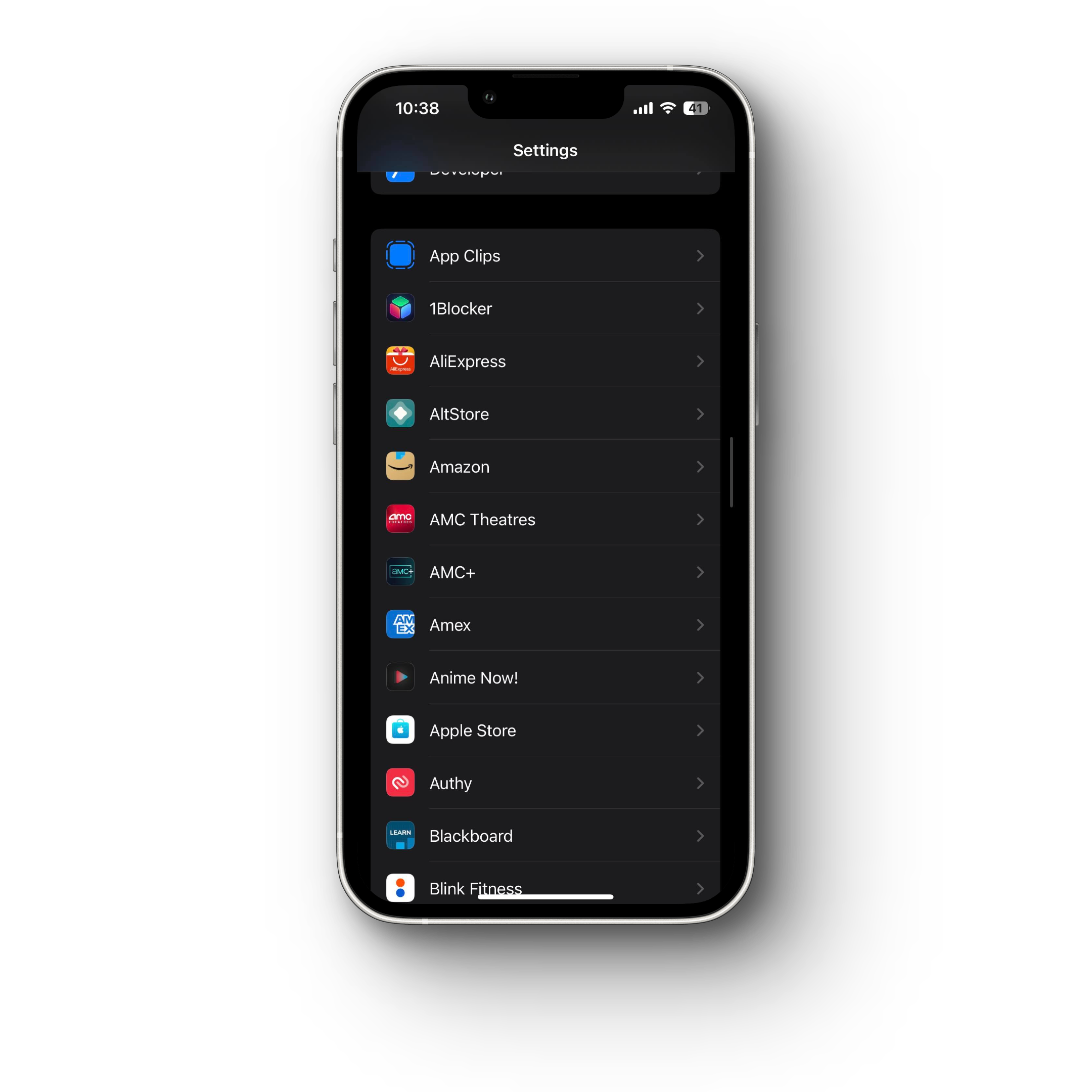
For iPhone Users:
- Open the Settings app
- Scroll down to check out apps
- If you come across a strange one, remove it immediately.
Step 3: Use Antivirus Software
Antivirus software will isolate the malicious app in a sandbox, where it will have no access to the rest of your phone and then erase it automatically. Keep your antivirus program running in the background for continuous protection.
Step 4: Contact Businesses
You should contact any online or conventional businesses with your credit card or banking details. Determine the bank activities you wish to dispute and, if necessary, report them as fraudulent.
Step 5: Manage Wi-Fi
It’s a good idea to turn off Wi-Fi when it’s not in use or when you’re unsure about the security of a Wi-Fi connection, as hackers can access phones through public networks. Many devices have a convenient drop-down menu for this purpose.
Step 6: Factory-reset your Phone
In addition to the measures above, you can do a full factory reset to return your phone to how it was when you first received it. After a successful backup, proceed as follows:
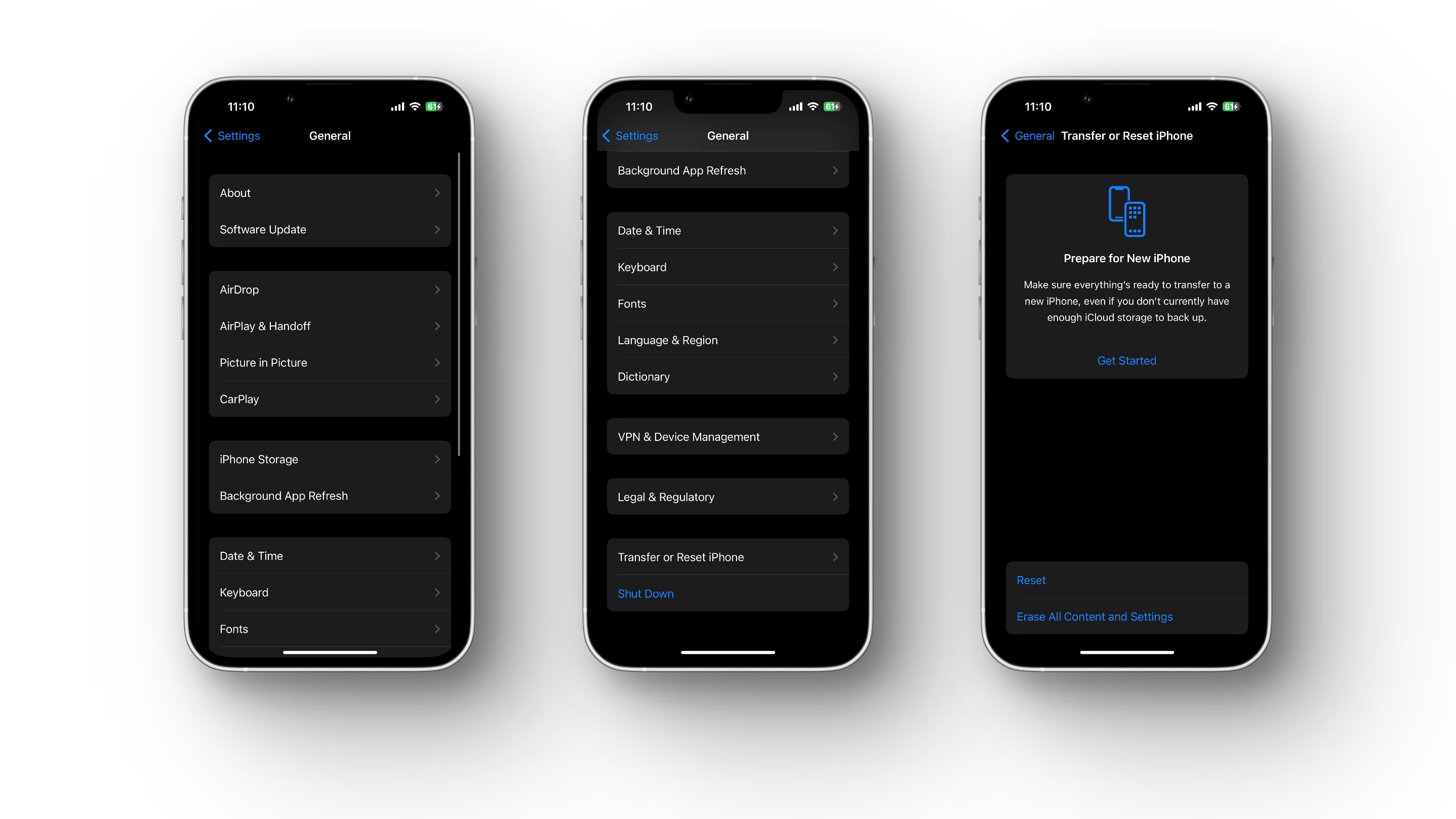
ForiPhone:
- Select Settings .
- Select the General tab.
- Click Reset .
- Tap Erase All Content and Settings .
- Enter your passcode or Apple ID password.
ForAndroid:
- Tap Settings .
- Select Backup and Reset. Backup and Reset
- To restore everything to its original state, select “ Factory Data Reset .” Factory Data Reset
- Press the “ Reset ” button. Click at Reset
- Tap “ Erase Everything .”
Step 7: Inform your Contacts
If your phone has been hacked, it’s essential to inform your contacts so they can take steps to protect themselves from phishing emails. or other scams or spam messages. Warn them about the risk of becoming the next victim if they follow any instructions in suspicious messages.
Step 8: Check App Permissions on your Phone
This will enable you to identify any applications on your device with access to private data, such as your current position based on your GPS locations.
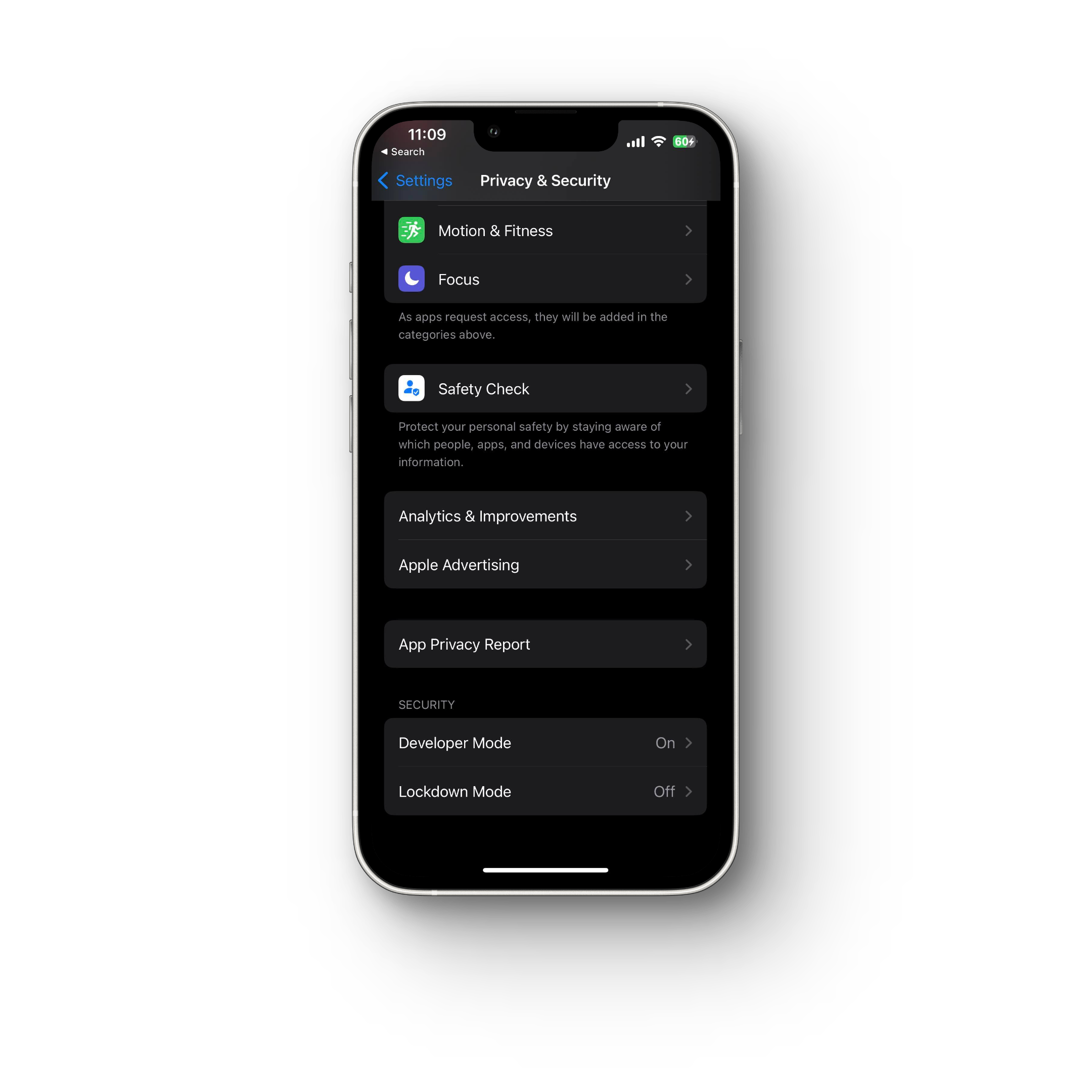
For iPhone:
Navigate to Settings > Privacy & Security for different permission levels. Here you can view which apps have access to which features, and you can also restrict access to applications as needed.
For Android:
- Navigate to “ Settings .”
- Click “ Security and Privacy. ” Security and Privacy
- Press “ Permission Manager .” Permission Manager
- To see which applications currently have access, tap the permissions tab. Currently Accessible Apps
How to Stop Someone from Hacking Your Phone Again
Stop Someone from Hacking Your Phone |WiredBugs
As more private information moves into digital form and is accessible via mobile devices, safeguarding against phone hacking becomes increasingly essential. Because methods are always changing, you must be careful about security.
The best way to safeguard yourself is to be cautious when using digital services, and luckily, many established protocols have been shown to reduce vulnerability to hacking.
Avoid downloading sketchy or disreputable apps
Malware is frequently masked as genuine software and distributed via third-party apps downloaded from unofficial websites rather than the official app stores. It’s best to avoid downloading apps from ads or questionable websites.
Don’t Jailbreak your phone
Jailbreaking increases your vulnerability to hacking because you can now access unofficial app stores. This means you won’t get the newest iOS updates , which can prevent threats like malware and spyware. To keep the jailbreak functional, jailbreakers avoid updating their devices. Because of this, you are even more likely to become a victim of hacking.
Use a VPN to stay safer on the go
Public Wi-Fi networks in airports, hotels, and even libraries can leave your phone vulnerable to hackers. Because of the open nature of these networks, any of your data can be intercepted by others. A VPN is a service that encrypts your online traffic so that others cannot intercept it while you are using a public network, such as a Wi-Fi connection.
Use a Password Manager
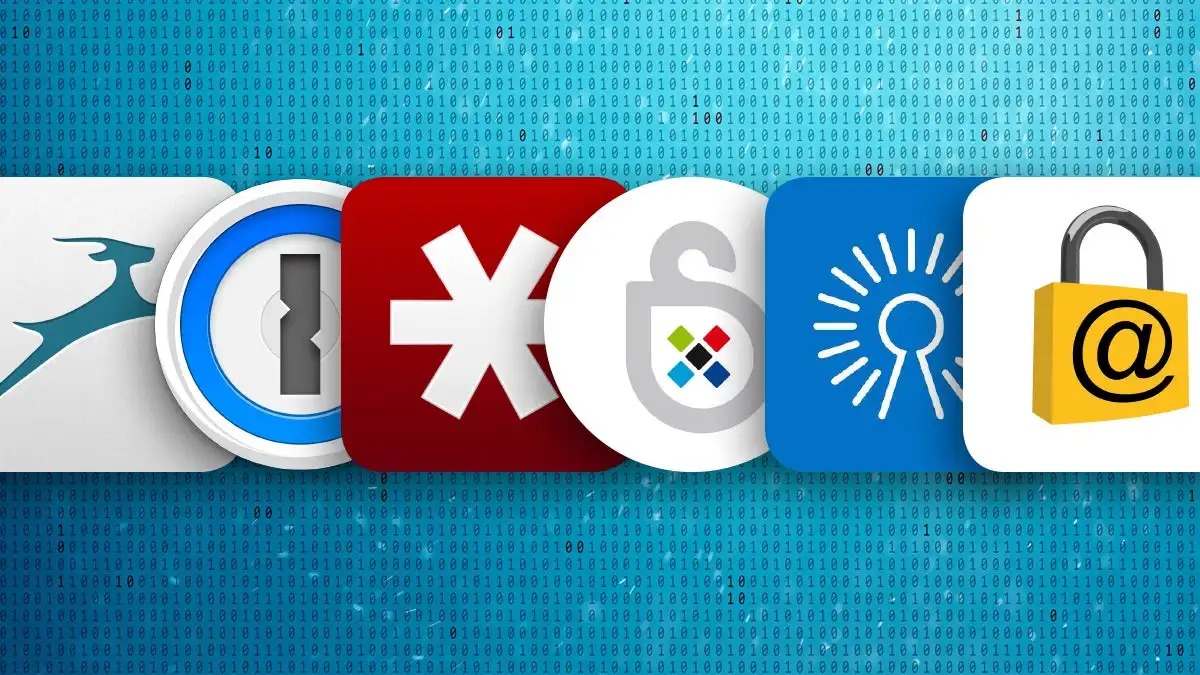
Use a Password Manager |PCWorld
Passwords that are both challenging and unique are, more thoroughly, the main line of defense. It’s easy to fall into the trap of using the same weak password for multiple accounts because it’s easier than remembering hundreds of different ones.
This is easy for hackers because a single password can unlock several accounts. Instead, you should utilize a password manager that can generate and securely keep your passwords. We recommend Bitwarden as it’s free and easy to use.
Don’t Click on Ads on Torrent or Similar Sites
Keep your phone updated
If you regularly upgrade your operating system, you’ll get any necessary security patches. Your device is more at risk of being attacked if you don’t keep it up-to-date.
Closing Thoughts
A hacked phone can significantly threaten your personal and financial information. Therefore, immediately removing the hacker from your phone and securing your data is crucial. Changing passwords, deleting suspicious apps, using antivirus software, contacting businesses, managing Wi-Fi, and performing a factory reset are some of the effective measures you can take.
Additionally, being mindful of your digital behavior, keeping your phone and apps up to date, and avoiding public Wi-Fi can help prevent someone from hacking your phone again. Following these tips can protect your phone and personal information from potential hackers.
Smartphone hackers employ various techniques to access users’ personal data. For example: Phishing attacks, Smishing attacks, Spyware, Scareware, Unsecure Wi-Fi, Malicious apps.
High mobile data usage, unplanned online purchases, and sudden changes to settings are just some of the unmistakable indications of a hacked phone.
If you suspect you have been hacked, you can take several important preventative measures. To eliminate threats from your mobile device, you can use security software or contact a mobile device security team, as mentioned above. Your online accounts’ passwords can be updated, and you should use different, robust passwords for each.
Most malware can be removed by factory reset, but you will lose all your data. To avoid losing data, repeat your setup before performing a factory restart. It would be best first to attempt clearing the phone’s cache, removing administrator privileges from all installed apps, and erasing any suspicious files.
How to Fix “Printer is in an error state” Issue?
- Recognizing the importance of a printer’s duty cycle is crucial for choosing a device that matches your print volume needs. Staying within this limit ensures the printer operates efficiently and prolongs its lifespan, minimizing the risk of maintenance issues.
- Proper humidity, temperature, and cleanliness management can significantly enhance printer performance and maintain its duty cycle, preventing unnecessary wear.
- Enhancing a printer with upgrades like additional memory or better mechanical parts can improve its workload handling and extend its practical duty cycle, boosting overall durability and efficiency.
When choosing a new printer, you might come across the term “ duty cycle ” in the specifications. This guide will explain what a duty cycle is, why it matters, and how it can help you choose the right printer. We’ll keep things simple so you can easily understand how to use this information when shopping for a printer.
- Printer Duty Cycle: What It Means and Why It Matters?
- Why the Duty Cycle Is Key to Choosing the Right Printer?
- Duty Cycle vs. Recommended Monthly Print Volume: What’s the Difference?
- What Happens If You Ignore Printer Duty Cycle Recommendations? ↪ Real-World Scenarios: Why Exceeding the Duty Cycle Can Cost You
Printer Duty Cycle: What It Means and Why It Matters?

What is the meaning of Printer Duty Cycle?
The printer duty cycle represents the upper limit of a printer’s capacity—how many pages it can reliably process in a month before the risk of wear or malfunction increases. This figure is crucial for understanding printer performance limits and ensuring that your chosen printer can handle the expected work volume.
Manufacturers determine a printer’s duty cycle through stress testing, where the printer is pushed to its limit to identify how many pages it can produce each month before malfunctioning. These tests help set a reliable performance gateway for users.
A printer’s duty cycle is like a car’s speedometer—you wouldn’t drive a car at top speed all the time, and you shouldn’t push a printer to its maximum duty cycle. Doing so can lead to quicker wear and tear, more frequent maintenance, and a shorter lifespan.
If you’re unsure whether to choose an inkjet or laser printer, this detailed guide compares both options to help you make an informed decision.
Why the Duty Cycle Is Key to Choosing the Right Printer?

The Importance of Duty Cycle in printer selection
Knowing the duty cycle is essential when choosing a printer, as it determines how well the device can handle your monthly print volume without excessive wear or maintenance.
Here is why the duty cycle matters in printer selection:
- Fit for purpose: Selecting a printer with a suitable duty cycle ensures it can handle your monthly printing volume efficiently, reducing stress on its components.
- Longer lifespan and better performance: Staying within the duty cycle ensures optimal print quality and speed while prolonging the printer’s life, avoiding frequent breakdowns.
- Cost efficiency and reduced downtime: Operating within the duty cycle minimizes the need for repairs and reduces operational disruptions, managing long-term costs.
Duty Cycle vs. Recommended Monthly Print Volume: What’s the Difference?

Duty Cycle vs. recommended monthly print volume
The recommended monthly print volume is the optimal number of pages a printer should handle each month for the best performance and longevity. Unlike the maximum capacity indicated by the duty cycle, this number guides regular usage, ensuring the printer operates efficiently without excessive wear.
If your print volume regularly exceeds the recommended amount but stays within the duty cycle, the printer may operate safely in the short term, but it could still experience accelerated wear and reduced lifespan over time.
In such cases, consider upgrading to a higher-capacity printer or spreading print jobs across multiple devices to ensure long-term performance.
Here are the differences between the duty cycle and recommended monthly print volume:
- Duty cycle: Represents the maximum number of pages a printer can handle in a month without breaking down. It assesses the printer’s upper limit.
- Recommended monthly print volume: Suggests a practical, workable number of pages to print each month to keep the printer in good condition over its lifespan.
What Happens If You Ignore Printer Duty Cycle Recommendations?

Consequences of ignoring Duty Cycle recommendations |AndranikHakobyan via Canva
Ignoring the duty cycle limits poses more severe risks than exceeding the recommended monthly print volume, leading to serious long-term consequences.
While exceeding the recommended volume occasionally may result in additional wear and tear, consistently exceeding the duty cycle can lead to frequent breakdowns, reduced performance, and a shortened lifespan.
Ignoring duty cycle limits leads to frequent breakdowns, reduced performance, and increased maintenance, ultimately shortening the printer’s lifespan and causing more frequent operational downtime and higher repair costs. Long-term, pushing a printer beyond its limits leads to greater financial burdens due to premature replacements and inefficiencies.
↪ Real-World Scenarios: Why Exceeding the Duty Cycle Can Cost You
For example, in a busy law firm, overlooking duty cycle limits during a high-stakes period could cause a printer breakdown just before a critical deadline, delaying crucial legal filings and ultimately compromising client service.
For small businesses, consistently exceeding a printer’s duty cycle can lead to costly emergency repairs or premature equipment replacements, straining financial resources.
