In today’s digital era, managing multiple passwords for various websites and online services can be overwhelming and tricky. Reusing passwords across accounts increases vulnerability to hacking as well. Thankfully, using a Google account for sign-ins offers convenience, but it raises valid concerns about security at the same time.
The following guide will discuss a few possible risks associated when one signs in using Google credentials. But before that, let’s understand the tech behind log-in using Google.
- What Happens When You Sign in with Google? Pros of Signing with Google 1. Convenience and Easy Access 2. Single Sign-on 3. Google’s Security Risks of Signing with Google 1. All Linked Accounts Can Be Compromised if Your Google Account is Hacked 2. What if Google Goes Down? 3. What if Your Google Account Can Gets Suspended 4. Your Information is Accessible to Third-Party Sites 5. Google’s Terms and Policies Can Change 6. Risk of a Phishing Attack?
- Our Recommendation
- Ask Yourself!
- How to Remove Google-Sign in on a Third-Party Website?
- Conclusion
What Happens When You Sign in with Google?
You can avoid this step altogether by signing in with Google on the site. You are instead dependent on the services themselves to verify your identity and handle your account. When you select the option to log in with your Google account on a website or application, a request is sent to the Google Sign-In service .

Using Google to Sign-in on Shopify
You are then redirected to the Google Sign-In page , where you are prompted to enter your Google account credentials, such as your email address and password.
After successful authentication, the website or application may request certain permissions to access your Google account information or perform specific actions on your behalf. This could include accessing your basic profile information, contacts, or even the ability to manage your Google Calendar or send emails .
After verifying the user’s identity, Google returns an authentication token confirming that the user is the one they claimed to be. The website receives the authorization code and sends it to Google’s servers for verification.
Once the code is validated, the website or application receives an access token. This confirms your identity and grants you access to the requested services or features.
For any future attempts at exploring the website, you just need to sign-in with your Google account. Since most people already have their Google account signed in, Google just shows a pop-up on the website, and one-click login feature allows access to the website.

One-Click Sign Up
Now you can explore the site at your leisure.
With Google, you can limit who sees what you post and how often. Keep in mind that declining permission can render certain services inoperable as well.
Pros of Signing with Google
Using Google to sign-in brings an array of benefits for the users.
1. Convenience and Easy Access

Google Offers Convenience | Pixabay
Signing in with your Google account also enables you to sync your information across many devices. Using the same Google account across your smartphone, laptop, and tablet ensures instantaneous access to your information without the need for manual syncing. This facilitates a more streamlined and efficient user experience.
2. Single Sign-on
Google’s single sign-on feature allows you to use your Google account to log in to multiple applications, saving time and reducing the need to remember multiple passwords. This streamlined process enhances security and simplifies account access management in case of lost devices or forgotten passwords.

Google Single Sign-On |PlayPosit
3. Google’s Security
Most websites lack the financial means to spend as much on security as Google. Alternatively, you should consider whether or not you feel secure entrusting the website in question with your personal data. You probably trust Google more than an unknown, smaller website to accomplish this.
One significant advantage of using Google Sign-In is that the website or application you’re accessing doesn’t have access to your actual password. Instead, they receive a token that verifies your Google account, without exposing your personal information. This means that even if the website experiences a security breach, there is no real account for your data to be compromised within their system.
Google Security |Google Blog
You can always withdraw their token and prevent them from accessing your data, regardless of whether the website is hacked or you decide to quit. In comparison to the account management system used by the average website user, which cannot often remove accounts, this is a major benefit.
Risks of Signing with Google
Now, while there are quite a few benefits associated with signing in with Google, there are certain risks which most people overlook.
1. All Linked Accounts Can Be Compromised if Your Google Account is Hacked
One significant risk of using a Google account as a sign-in method for non-Google websites is that if your Google account is hacked or compromised, it can potentially lead to the compromise of all linked accounts.
When you use your Google account as a master passphrase to access multiple non-Google websites, it means that your Google password serves as the key to unlock all of these accounts. If hackers access your Google account, they can navigate to the account’s settings, where they may find a list of connected services or websites.
If you think about it, this gives endless possibilities and access to a hacker. This is a major risk for a user who has their Google account connected with numerous important applications.
2. What if Google Goes Down?

Google Not Working |SEO Roundtable
While the chances of this event are thin, the possibility cannot be completely neglected.
In the event of an extended outage or disruption of Google services, users may not only lose access to Google itself but also to any other websites that rely on Google for authentication.
Over the course of several years, Google has experienced significant service disruptions in multiple episodes. These incidents occurred in 2013, 2014, 2018, 2020 , and 2022 resulting in widespread outages across various Google services. The disruptions had an adverse impact on users who rely on Google’s platforms for their daily activities and business operations.
What this indicates is the fact that even the bigger tech giants, like Facebook , or Google are not completely safe from any such problems. As a matter of fact, bigger companies may sometimes take too long to have their servers fixed.
3. What if Your Google Account Can Gets Suspended
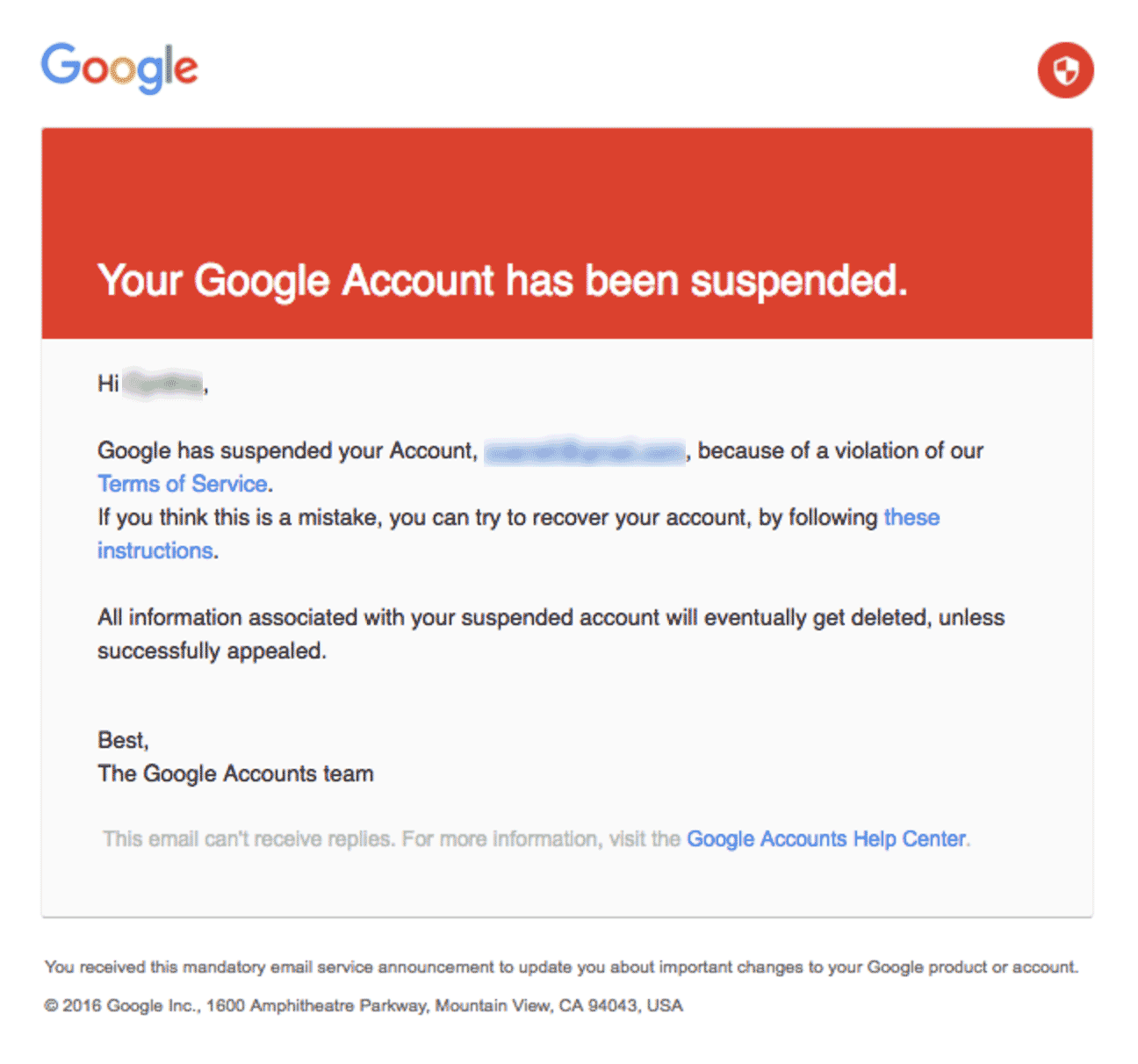
Google Account Suspended |GMass
Another case is if you forget your Google account password or face issues with the account recovery process, you may be locked out of your account. This means you won’t be able to access any websites or services that rely on your Google account for authentication until the issue is resolved, which can be a time-consuming and potentially frustrating process.
As a result of either of those issues, what’s compromised even more is your access to the third-party Non-Google website.
4. Your Information is Accessible to Third-Party Sites
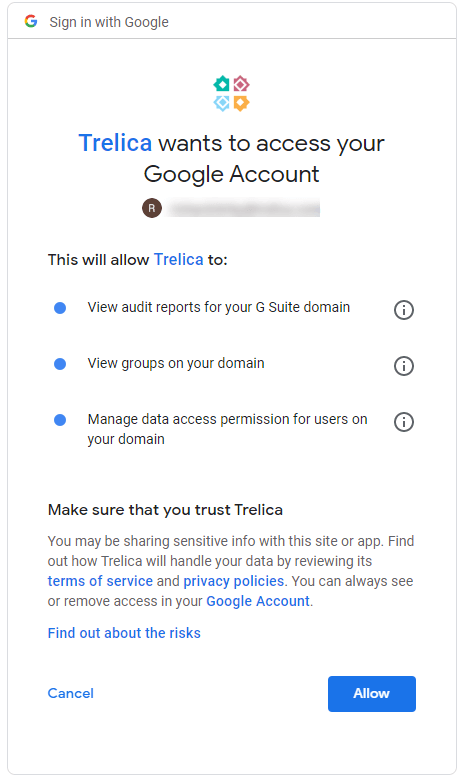
Data Access by Third-Party Websites |Trelica
When using Google Sign-In, you grant the website access to certain information from your Google account, such as your basic profile details, email address, and potentially other permissions. This raises concerns about data privacy, as the website may collect and store this information, potentially sharing it with third parties without your knowledge or consent.
There is no way to retrieve information once it has been sent to a third-party service. Your friends’ privacy may potentially be at risk without your knowledge. The following are some examples of the information that various sites may access from your Google account:
- Contacts
- To-do list; planner; timetable etc
- Google Wallet
- Your Birthday
- Your social media profiles
For example, a website might request access to your Google Calendar, contacts, or even the ability to send emails on your behalf. By granting these permissions, you are essentially allowing the website to access and utilize that specific information from your Google account.
Besides, the website receiving your Google account information could store this data within their own systems and share it with other third-party entities without your explicit knowledge or consent.
5. Google’s Terms and Policies Can Change

Google Policies |GCF Global
Most people don’t read the fine print of policies by Google or other companies. Many users simply accept the terms and conditions without fully grasping the extent of their implications. This lack of awareness can leave individuals unaware of how their data is being used and shared by Google and its partner websites and applications.
Therefore, the question arises: What if Google changes the terms and policies some day which gives any loophole access to hackers. Again, the chances of such an occurrence are thin, since Google is quite strongly focused on security. However, they cannot be entirely neglected as even today, tech giants including Google are facing numerous security issues.
6. Risk of a Phishing Attack?

Phishing Attack | Pixabay
Phishing attacks continue to pose a significant threat, and it’s important to exercise caution when using Google as an authentication method, especially on potentially fraudulent websites.
Let’s consider a scenario where a website promises large sums of money without any upfront investment, which is a classic red flag for a scam. However, despite the warning signs, many individuals still fall victim to these schemes.
In such cases, the website may prompt you to authenticate with Google, leading you to a page that appears identical to the genuine Google Sign-In page. This is a textbook example of a phishing attack, where cybercriminals attempt to trick you into disclosing your Google email and password. Unfortunately, as soon as you submit this information on the fake form, it lands directly in the hands of hackers.
In 2019, 65% of American businesses experienced effective phishing attacks . This highlights the critical need for vigilance when it comes to using Google as an authentication method, particularly on unfamiliar or suspicious websites.
Our Recommendation

Google Offers the Finest Internet Security |Google
The utilization of Google as an authentication method for other applications carries certain risks, but it remains one of the most convenient and secure approaches available, so far.
Google has made significant strides in enhancing security measures and addressing vulnerabilities. They have implemented features like two-factor authentication , which adds an additional layer of protection by requiring a verification code in addition to your password .
Furthermore, Google’s advanced security systems include measures such as new location login notifications, which alert you if someone tries to access your account from an unfamiliar location, and mobile-based authentication for added security when logging in from different devices.
It’s also important to note that Google invests heavily in securing user accounts and employs sophisticated algorithms to detect and prevent unauthorized access. They continuously monitor for suspicious activities, such as login attempts from unfamiliar locations or devices, and prompt additional verification steps to ensure the account owner’s identity.
It is worth noting that in 2018 Sundar Pichai , the CEO of Google, was called to testify before Congress to address concerns related to data privacy and potential anticompetitive practices. “ Sundar Pichai’s testimony emphasized Google’s commitment to user privacy, transparency, and control over personal data. He highlighted investments in privacy measures, restricted third-party access, and addressed concerns about data protection and competition.”

Sundar Pichai Testifying Before Congress |New York Times
Comparing the security measures implemented by Google with those of average websites, it becomes evident that Google provides a significantly higher level of security. Therefore, considering the combination of convenience and robust security measures offered by Google Sign-In, it remains the recommended choice for users seeking an efficient and secure authentication method.
Ask Yourself!
While signing in with Google can speed up the process of accessing applications, doing so raises worries about the user’s privacy and security. Think about the following before deciding whether or not to use your Google account:
- What is the importance of privacy to you?
- Is it safe to join up for this new service?
- Which details are you willing to reveal?
- Will you need a Google account to use this software, or will it work without it?
Signing in with Google is not the ideal choice for you if you value privacy and want more control over your data. Using Google credentials is convenient if you are already familiar with Google and trust the app or website you are signing up for.
How to Remove Google-Sign in on a Third-Party Website?
After reading this guide, many of you might decide to not use your Google account anymore as a preferred mode of sign-in. Therefore, if you wish to revoke Google account access to certain websites, applications, or even all of them, follow this simple procedure.
Step 1: Access Your Google Account
The first step is to access your Google account by going to accounts.google.com . Enter your email and password over here. In case you are already logged in, you’ll be shown a screen like this.

Google Accounts Homescreen
Step 2: Access Security Settings
In the column on the left side, you will see the option “ Security ”. Once you access this page, scroll down to where it says “ Your Connections to Third-Party Apps & Services ”. Next, click “ See All Connections ”.

Accessing Third-Party Apps List from Google Accounts
Step 3: Find the Website You Want to Remove Access From
Finding the website or application you wish to remove your Google account from is quite easy. Simply use the search bar for this purpose. you find your desired application, click on the arrow pointing to the right “ > ”.

Accessing Individual Application Access via Google Account
Step 4: Revoke Access
On the next screen, you will see an option that states “ Delete All Your Connections ” followed by the application’s name. Click this option.

Step 5: Confirm Access Revocation
When you choose to revoke access from a website or application through Google, a prompt from Google will inform you about the implications of this decision. It will clarify that by revoking access, the website or application will no longer have permission to use your Google account. However, it’s important to note that any data previously shared with the website or application will remain intact.

Confirming to Remove Google Account Sign-In
For instance, if you searched for a hotel on Booking.com while signed in with your Google account, that search history will still be associated with your Booking.com account. To remove such data, you will need to log in to the specific website’s portal and follow their data deletion process, which can vary depending on the platform.
Click on “ Confirm ” to proceed.
Step 6: Make a New Account on the Website
Conclusion
Using Google Sign-In introduces risks such as data privacy concerns, security vulnerabilities, dependence on a single account, and potential for phishing attacks as well.
Google implements various security measures, including two-factor authentication, new location login notifications, mobile-based authentication, and advanced algorithms to detect and prevent unauthorized access.
Pay close attention to the URL and page design. Ensure the URL starts with “https://” and matches the official Google domain. Look for indicators like the lock icon and confirm that the page design is consistent with Google’s official login pages.
Yes, you can manage and revoke permissions granted to third-party websites by accessing your Google account settings.
How to Fix “Printer is in an error state” Issue?
- Recognizing the importance of a printer’s duty cycle is crucial for choosing a device that matches your print volume needs. Staying within this limit ensures the printer operates efficiently and prolongs its lifespan, minimizing the risk of maintenance issues.
- Proper humidity, temperature, and cleanliness management can significantly enhance printer performance and maintain its duty cycle, preventing unnecessary wear.
- Enhancing a printer with upgrades like additional memory or better mechanical parts can improve its workload handling and extend its practical duty cycle, boosting overall durability and efficiency.
When choosing a new printer, you might come across the term “ duty cycle ” in the specifications. This guide will explain what a duty cycle is, why it matters, and how it can help you choose the right printer. We’ll keep things simple so you can easily understand how to use this information when shopping for a printer.
- Printer Duty Cycle: What It Means and Why It Matters?
- Why the Duty Cycle Is Key to Choosing the Right Printer?
- Duty Cycle vs. Recommended Monthly Print Volume: What’s the Difference?
- What Happens If You Ignore Printer Duty Cycle Recommendations? ↪ Real-World Scenarios: Why Exceeding the Duty Cycle Can Cost You
Printer Duty Cycle: What It Means and Why It Matters?

What is the meaning of Printer Duty Cycle?
The printer duty cycle represents the upper limit of a printer’s capacity—how many pages it can reliably process in a month before the risk of wear or malfunction increases. This figure is crucial for understanding printer performance limits and ensuring that your chosen printer can handle the expected work volume.
Manufacturers determine a printer’s duty cycle through stress testing, where the printer is pushed to its limit to identify how many pages it can produce each month before malfunctioning. These tests help set a reliable performance gateway for users.
A printer’s duty cycle is like a car’s speedometer—you wouldn’t drive a car at top speed all the time, and you shouldn’t push a printer to its maximum duty cycle. Doing so can lead to quicker wear and tear, more frequent maintenance, and a shorter lifespan.
If you’re unsure whether to choose an inkjet or laser printer, this detailed guide compares both options to help you make an informed decision.
Why the Duty Cycle Is Key to Choosing the Right Printer?

The Importance of Duty Cycle in printer selection
Knowing the duty cycle is essential when choosing a printer, as it determines how well the device can handle your monthly print volume without excessive wear or maintenance.
Here is why the duty cycle matters in printer selection:
- Fit for purpose: Selecting a printer with a suitable duty cycle ensures it can handle your monthly printing volume efficiently, reducing stress on its components.
- Longer lifespan and better performance: Staying within the duty cycle ensures optimal print quality and speed while prolonging the printer’s life, avoiding frequent breakdowns.
- Cost efficiency and reduced downtime: Operating within the duty cycle minimizes the need for repairs and reduces operational disruptions, managing long-term costs.
Duty Cycle vs. Recommended Monthly Print Volume: What’s the Difference?

Duty Cycle vs. recommended monthly print volume
The recommended monthly print volume is the optimal number of pages a printer should handle each month for the best performance and longevity. Unlike the maximum capacity indicated by the duty cycle, this number guides regular usage, ensuring the printer operates efficiently without excessive wear.
If your print volume regularly exceeds the recommended amount but stays within the duty cycle, the printer may operate safely in the short term, but it could still experience accelerated wear and reduced lifespan over time.
In such cases, consider upgrading to a higher-capacity printer or spreading print jobs across multiple devices to ensure long-term performance.
Here are the differences between the duty cycle and recommended monthly print volume:
- Duty cycle: Represents the maximum number of pages a printer can handle in a month without breaking down. It assesses the printer’s upper limit.
- Recommended monthly print volume: Suggests a practical, workable number of pages to print each month to keep the printer in good condition over its lifespan.
What Happens If You Ignore Printer Duty Cycle Recommendations?

Consequences of ignoring Duty Cycle recommendations |AndranikHakobyan via Canva
Ignoring the duty cycle limits poses more severe risks than exceeding the recommended monthly print volume, leading to serious long-term consequences.
While exceeding the recommended volume occasionally may result in additional wear and tear, consistently exceeding the duty cycle can lead to frequent breakdowns, reduced performance, and a shortened lifespan.
Ignoring duty cycle limits leads to frequent breakdowns, reduced performance, and increased maintenance, ultimately shortening the printer’s lifespan and causing more frequent operational downtime and higher repair costs. Long-term, pushing a printer beyond its limits leads to greater financial burdens due to premature replacements and inefficiencies.
↪ Real-World Scenarios: Why Exceeding the Duty Cycle Can Cost You
For example, in a busy law firm, overlooking duty cycle limits during a high-stakes period could cause a printer breakdown just before a critical deadline, delaying crucial legal filings and ultimately compromising client service.
For small businesses, consistently exceeding a printer’s duty cycle can lead to costly emergency repairs or premature equipment replacements, straining financial resources.
