Keyboard Shortcuts help us save time when working on softwares like Microsoft Word. Every software that you use has its own shortcut keys which can be used by you. If you often use Microsoft Word, you might already be aware of some of the keys like the shortcut key for copying and pasting. One of the many formatting tools includes the combination for ‘strikethrough’ which is applied to a certain sentence or a word. You might want to learn this shortcut for Strikethrough as it is a very common feature on Microsoft Word and the next time you want to use it, you might as well use these keys instead of clicking on the icon for strikethrough.
What is Strikethrough
Strikethrough is the line that appears on a word or a sentence that you selected. It gives an impression of a ‘strike’ through the word, and that is the reason why it is called ‘strikethrough’. People usually use this formatting tool to show the reader that this word is not included in the article or just not be considered as important for the reader. For instance, when you Google a few keywords, you will notice that under all the results that appear on the screen, there would be words which have been strikethrough-ed. Here, Google is trying to tell its viewers that this certain result does not include this struck word.

The word with the strike shows that this result does not include this word here, on Google, this is the criteria for strikethrough for this specific website. It can mean anything differently on other forums.
How to Strikethrough a Word or Sentence on Microsoft Word, Wordpress or Other Similar Forums
When you are using a documenting software, like Microsoft Word, Wordpress or Google Docs, you can locate a tab on the top toolbar for all of these programs, which offers the strikethrough option available just one click away. The recognition for this is that it will show you the alphabets ‘abc’ written with a strike literally through the center of the alphabets like ‘abc’.

Strikethrough for Wordpress

Strikethrough tab for Microsoft Word
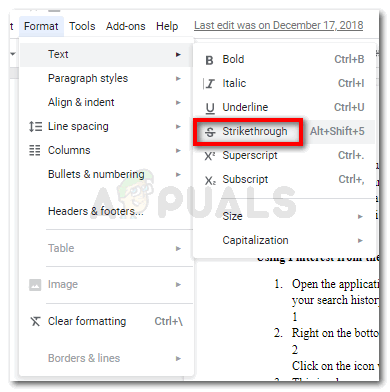
Strikethrough for Google Docs can be accessed by going to the Format tab, then clicking on the Text tab, and finally finding the strikethrough tab.
What is the Keyboard Shortcut for Strikethrough
To your surprise, there is no shortcut key for Strikethrough for Microsoft Word by default. However, you can create one by following the steps mentioned below.
- Open the Font dialogue box by clicking on the arrow as shown in the image below. Click on this arrow
- A font dialogue box will open. Here, you have to press the keys Ctrl and Alt, both at the same time, which will change the cursor to look something like the command key in an Apple laptop. Once the cursor changes, now you need to click on the checkbox for Strikethrough which will open another box where you can now enter the shortcut keys for strikethrough. press Ctrl + Alt keys here.
- Enter the keys of your choice which you want to be paired with Ctrl + Alt. I entered Ctrl + Alt + Shift and pressed the Assign tab to confirm this shortcut key. Ctrl + Alt + S
- I can now use this short key on Microsoft Word whenever I want to strikethrough a text.
- Keyboard Shortcut for WordPress is Shift+Alt+ D. And for Google Docs, it is Alt+Shift+5
How to Fix “Printer is in an error state” Issue?
- Recognizing the importance of a printer’s duty cycle is crucial for choosing a device that matches your print volume needs. Staying within this limit ensures the printer operates efficiently and prolongs its lifespan, minimizing the risk of maintenance issues.
- Proper humidity, temperature, and cleanliness management can significantly enhance printer performance and maintain its duty cycle, preventing unnecessary wear.
- Enhancing a printer with upgrades like additional memory or better mechanical parts can improve its workload handling and extend its practical duty cycle, boosting overall durability and efficiency.
When choosing a new printer, you might come across the term “ duty cycle ” in the specifications. This guide will explain what a duty cycle is, why it matters, and how it can help you choose the right printer. We’ll keep things simple so you can easily understand how to use this information when shopping for a printer.
- Printer Duty Cycle: What It Means and Why It Matters?
- Why the Duty Cycle Is Key to Choosing the Right Printer?
- Duty Cycle vs. Recommended Monthly Print Volume: What’s the Difference?
- What Happens If You Ignore Printer Duty Cycle Recommendations? ↪ Real-World Scenarios: Why Exceeding the Duty Cycle Can Cost You
Printer Duty Cycle: What It Means and Why It Matters?

What is the meaning of Printer Duty Cycle?
The printer duty cycle represents the upper limit of a printer’s capacity—how many pages it can reliably process in a month before the risk of wear or malfunction increases. This figure is crucial for understanding printer performance limits and ensuring that your chosen printer can handle the expected work volume.
Manufacturers determine a printer’s duty cycle through stress testing, where the printer is pushed to its limit to identify how many pages it can produce each month before malfunctioning. These tests help set a reliable performance gateway for users.
A printer’s duty cycle is like a car’s speedometer—you wouldn’t drive a car at top speed all the time, and you shouldn’t push a printer to its maximum duty cycle. Doing so can lead to quicker wear and tear, more frequent maintenance, and a shorter lifespan.
If you’re unsure whether to choose an inkjet or laser printer, this detailed guide compares both options to help you make an informed decision.
Why the Duty Cycle Is Key to Choosing the Right Printer?

The Importance of Duty Cycle in printer selection
Knowing the duty cycle is essential when choosing a printer, as it determines how well the device can handle your monthly print volume without excessive wear or maintenance.
Here is why the duty cycle matters in printer selection:
- Fit for purpose: Selecting a printer with a suitable duty cycle ensures it can handle your monthly printing volume efficiently, reducing stress on its components.
- Longer lifespan and better performance: Staying within the duty cycle ensures optimal print quality and speed while prolonging the printer’s life, avoiding frequent breakdowns.
- Cost efficiency and reduced downtime: Operating within the duty cycle minimizes the need for repairs and reduces operational disruptions, managing long-term costs.
Duty Cycle vs. Recommended Monthly Print Volume: What’s the Difference?

Duty Cycle vs. recommended monthly print volume
The recommended monthly print volume is the optimal number of pages a printer should handle each month for the best performance and longevity. Unlike the maximum capacity indicated by the duty cycle, this number guides regular usage, ensuring the printer operates efficiently without excessive wear.
If your print volume regularly exceeds the recommended amount but stays within the duty cycle, the printer may operate safely in the short term, but it could still experience accelerated wear and reduced lifespan over time.
In such cases, consider upgrading to a higher-capacity printer or spreading print jobs across multiple devices to ensure long-term performance.
Here are the differences between the duty cycle and recommended monthly print volume:
- Duty cycle: Represents the maximum number of pages a printer can handle in a month without breaking down. It assesses the printer’s upper limit.
- Recommended monthly print volume: Suggests a practical, workable number of pages to print each month to keep the printer in good condition over its lifespan.
What Happens If You Ignore Printer Duty Cycle Recommendations?

Consequences of ignoring Duty Cycle recommendations |AndranikHakobyan via Canva
Ignoring the duty cycle limits poses more severe risks than exceeding the recommended monthly print volume, leading to serious long-term consequences.
While exceeding the recommended volume occasionally may result in additional wear and tear, consistently exceeding the duty cycle can lead to frequent breakdowns, reduced performance, and a shortened lifespan.
Ignoring duty cycle limits leads to frequent breakdowns, reduced performance, and increased maintenance, ultimately shortening the printer’s lifespan and causing more frequent operational downtime and higher repair costs. Long-term, pushing a printer beyond its limits leads to greater financial burdens due to premature replacements and inefficiencies.
↪ Real-World Scenarios: Why Exceeding the Duty Cycle Can Cost You
For example, in a busy law firm, overlooking duty cycle limits during a high-stakes period could cause a printer breakdown just before a critical deadline, delaying crucial legal filings and ultimately compromising client service.
For small businesses, consistently exceeding a printer’s duty cycle can lead to costly emergency repairs or premature equipment replacements, straining financial resources.
