Everyday browsers like Google Chrome and even Firefox take up a lot of memory and can slow down your low-end device significantly. Whether you are using a mobile, a windows PC or a Mac , heck, even a smart TV, if your system is up to certain standard, you need a browser that can support your low-memory and less capable device.
There are several low-resource browsers available. These browsers may lack the polish of more well-known ones, but they won’t drain your battery or slow down your device nearly as much. We have selected the best option for each low-end device. The browsers we selected are lightweight, fast, and compatible with your low-end devices.

Why do you need lightweight browsers?
These web browsers are more portable, efficient, faster, and space-saving than their predecessors. Web pages load much more quickly in lightweight browsers, which are optimized for low-end mobile devices.
They only display the necessary bits of code and elements, such as search results, without ads. Their primary focus is on providing users with a seamless, instantaneous, and problem-free experience, especially on low-end devices. They, too, include a handful of functions that are necessary for any user but which have little effect on the user’s phone’s performance.
Best browser for low-end Windows devices
Modern browsers can be demanding on low-end Windows devices, so it’s crucial to pick a lightweight browser designed for those devices. The best for low-end Windows devices is:
1. K-Meleon browser

K-Meleon web browser |Softcamel
K-Meleon is an excellent choice if you need a browser that loads pages quickly and responds to your clicks by taking less memory on your system. It’s one of the greatest browsers for a slow and low-end PC because it uses the same Gecko engine as Firefox and can work on as little as 20 MB of RAM .
The browser’s appearance (skin), behavior (buttons, menus, toolbar), and more are all adjustable. K-Meleon is compatible with Windows XP SP3, and the latest browser versions are available for download with other versions of Windows 7 and 8.
The design is reminiscent of an ancient computer’s user interface . It functioned normally and felt responsive, and the browser could not load websites like YouTube , so it does have some compromises. Additionally, K-Meleon uses plugins instead of extensions to implement new features.
Alternative: Pale Moon
Even more pleasantly, you can pick from a wide variety of add-ons and skins that have already been developed. This makes Pale Moon a respectable option for anyone with a slow PC but needs an all-purpose browser.
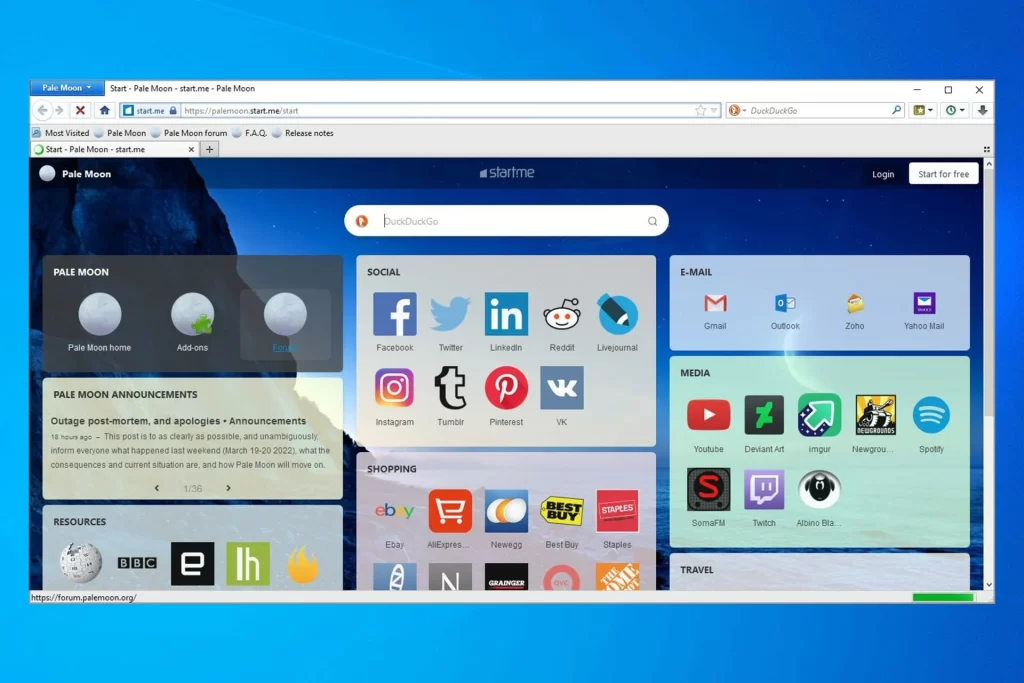
The Pale Moon browser |Windows Report
Best browser for low-end MacOS devices
Macs are not known to be “slow” devices, per se, but older models with outdated MacOS version can still be prone to the shortcomings of planned obsolesce. However, several browsers are especially well-suited for less powerful Macs due to their compact and efficient architecture, so let’s take a look at the definitive option.
Brave browser

Brave web browser |MacRumers
Brave Browser may be the best option if you’re looking for a fast, safe browser for your old Mac. The browser designers claim it is three to six times faster than similar offerings.
You can rest assured that this browser will have a secure browsing experience because it protects you from malicious software and tracking cookies. Additionally, your browsing history is neither stored nor shared with outside parties by Brave. Your browser automatically switches to a secure HTTPS connection to protect your privacy.
And if you’re switching from Chrome , you can bring your extensions with you; the browser is compatible with them. Due to its built-in ad blocker, the Brave Browser protects your privacy and makes the web faster.
Best browser for low-end mobile devices
There are many excellent options for mobile web browsers; however, the most popular ones may not work well with your budget or older smartphone. Chrome, for instance, can experience significant performance issues on budget smartphones and tablets. Firefox isn’t much better in this regard.
Fortunately, multiple browsers are optimized to provide the fastest possible performance, making the most of the resources available.
Users with earlier iOS versions, such as iOS 9 or 10, and older Android versions can benefit greatly from these browsers, as they may not be able to run the newest, more resource-intensive browsers.
For Android: Opera Mini

Opera Mini mobile browser |NerdsChalk
You don’t need to tell you about Opera Mini ; it’s been around since flip phones and is actively being improved for both feature phones and smartphones. Opera Mini is the only browser on this list that uses a remote server to render web pages before sending them back to the user’s device.
For iOS: Puffin Cloud browser

Puffin Cloud browser for iOS |Apple Store
Puffin Cloud browser is a great option if you need a fast and efficient iOS browser for your older iPhone or iPad. The browser incorporates an ad blocker, so you won’t have to worry about annoying commercials ever again. Puffin Cloud browser is significantly quicker than other iOS browsers since it handles all queries in the cloud before sending the page to your phone.
Since all your traffic is encrypted, you can feel safe using Puffin Cloud browser on an unsecured Wi-Fi network. In conclusion, Puffin Cloud browser is a one-of-a-kind and lightning-fast iOS web browser worth checking out.
Best browser for low-end Linux devices
Several lightweight, efficient browsers are available for low-end Linux machines . As a bonus, several of these browsers have a simple look, which reduces the browser’s impact on the system’s resources and boosts performance on low-end Linux gadgets.
Pale Moon

Pale Moon Web Browser |LinuxBabe
Pale Moon is an open-source, Goanna-based web browser formed from its own, originally developed supplier after being forked off from Firefox/Mozilla code a few years ago. It prioritizes simplicity and speed by selectively choosing features and performance enhancements to enhance the browser’s stability and user experience. It also provides full customization options and a vast collection of plugins and themes to render the browser sincerely your own.
Pale Moon strives to provide an implementation that is as close to official web standards and specifications as possible (with minimal compromise). It does so by omitting several features to find a happy medium between ease of use, performance, and support for the latest developments in web technology.
Pale Moon for Linux can be downloaded as an xz-compressed tarball and installed wherever you like. Pale Moon prioritizes performance using the Microsoft C Compiler’s auto-parallelization and speed optimization features.
Best browsers for low-end Chromebook devices
It is essential to select a browser that maximizes the capabilities of low-end Chromebook devices while compensating for their weaknesses.
Bit Browser

Bit Browser for Chrombook |Google Store
If you’re looking for a speedy and versatile browser for your older modles of Chromebooks, go no further than Bit Browser . It works as an extension in the Chrome and Opera web browsers and is designed primarily for use with the Chrome operating system. The browsing experience in Bit browser is quick, safe, and devoid of potential threats.
And if you’re a news addict, you’ll be happy to know that Bit browser has you covered with the latest and greatest in science, business, entertainment, and sports.
The privacy and security of its users are prioritized by the Bit browser, which does not save the browsing histories of its users. Using a Bit browser can bypass filters and access otherwise inaccessible content without compromising your anonymity.
Users can safely access the internet without worrying about compromised personal information. In addition, it employs state-of-the-art technology to conduct searches and block websites from monitoring your online activity.
The speed with which Bit unblocked pages load is another feature worth mentioning. Additionally, it speeds up data exchange between URLs and their respective servers. The browser allows the user to open an unlimited number of tabs. Not only is it stable, but it can handle a lot of traffic and stress in the virtual world.
Best Browser for low-end Android/Google TV
Aside from playing local media stored on your device, you can stream games from your pc to your TV screen using programs like Kodi and Plex . On the other hand, you can access the web using your Android TV. There is no web browser pre-installed in the default OS installation.
TV Bro Browser

TV Bro Browser |udger
If you’re looking for a solid, lightweight, fast web browser for Google TV, go no further than TV Bro . The browser’s bookmark functionality makes it easy to save and access your most-used pages quickly and easily.
Also, the browser supports voice search , so you can conduct your research without ever having to lift a finger. It also has a private browsing option. In addition, it may be operated using the TV remote with no problems.
The web browser supports numerous users, so you can log in and out of different profiles to get the most out of it. New to the most recent browser version is the ability to permanently leave your AndroidOS Google TV’s screen on.
Final Verdict
There are several browsers available that are optimized for use on devices with lower capacities and memory. These web browsers are designed to be as light as possible on system resources, making them perfect for older or less powerful devices.
K-Melon is a fantastic web browser for older Windows mobile devices. It utilizes the Gecko platform and needs as little as 20 MB of RAM. Pale Moon is another alternative; it removes spyware and ads from your browser experience. Brave Browser is a fast, secure, and private web browser that works well on older MacOS devices.
Due to its ability to compress data before sending it to the device, Opera Mini is suitable for users with low cellular data or slow internet speeds on low-end mobile devices. Puffin Browser Pro is a minimal browser for iOS that boasts lightning-fast speeds and cloud acceleration.
How to Fix “Printer is in an error state” Issue?
- Browser fingerprinting is a method used by websites and online services to track users’ online behavior based on their unique browser and system settings.
- While it helps improve user experience and cybersecurity, it can also lead to potential privacy issues as it allows for persistent and hard-to-evade tracking.
- There are several ways to limit browser fingerprinting such as adjusting your browser’s privacy settings, using privacy-centric browsers, disabling JavaScript and Flash, using VPNs, or using the Tor Browser.
- As AI and browser technologies evolve, the techniques for browser fingerprinting and its countermeasures will become more sophisticated.
- Compliance with regulatory frameworks and privacy laws will be crucial in addressing the challenges associated with browser fingerprinting.

Browser fingerprinting is a discreet form of data collection that creates a unique digital signature based on your browser configuration, installed plugins, screen resolution, and more. This identifier allows websites and advertisers to track your activity across the internet, even without using personal information. As a result, entities can monitor your behavior and build detailed profiles for analytics or targeted advertising.
While it can improve service efficiency, browser fingerprinting poses serious privacy risks by enabling tracking without consent. This guide explores the technique in depth and offers actionable steps to help you conceal your browser fingerprint. Protecting it is crucial for maintaining anonymity and preserving your online privacy.
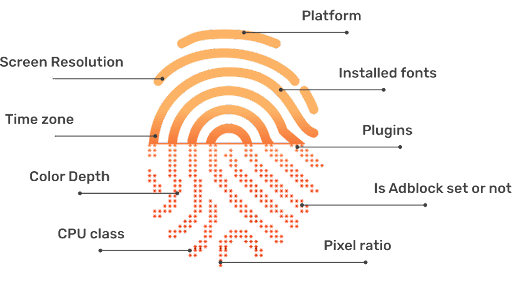
Your browser fingerprint typically consists of the following data points:
- User Agent : Details about your browser type, version, and operating system.
- HTTP Headers : Information on language preferences, accepted content types, and encoding.
- Screen Resolution : The size and resolution of your display screen.
- Timezone : The geographic time zone of your device.
- Installed Fonts : A list of fonts available on your computer.
- Plugins and Extensions : Information about extensions and plugins installed in your browser.
- Cookies : Small data files stored by websites on your device.
- WebGL and Canvas Fingerprinting : Data about your graphics capabilities and rendering engines.
- IP Address : A unique network identifier assigned to your device.
- Battery Status : Sometimes, information about your device’s battery level.
Why is Hiding Browser Fingerprint Important?
Any browser, regardless of its security focus, can be targeted by malicious actors. The complexity and volume of the modern web make it easier for harmful websites to take advantage of browser fingerprinting, often in subtle ways. It is vital to understand why your browser fingerprint matters so you can effectively protect yourself against potential misuse.
If you prefer, you can skip directly to our practical how-to section below.
1. Unique Identification
Browser fingerprinting enables the creation of a unique identifier for your browser, making it possible for third parties to recognize and track you across different sites. For instance, if you search for a product on an online store, your fingerprint can be used to associate your browsing habits with targeted ads, even after you have left the original website.
In many cases, your consent to data collection may have been obtained—often during sign-up—but users frequently overlook the fine print. Consequently, your data may be sold or shared without your full awareness.

2. Privacy Invasion
Browser fingerprinting poses a significant threat to your privacy by exposing sensitive information without your consent. For example, a news website that collects your fingerprint could infer your political preferences, which may later be exposed in a data breach or misused by third parties, potentially leading to harassment or discrimination.

The exposure of these tactics emphasized the real-world risks of browser fingerprinting—showing that data analytics can have serious implications for personal privacy and democratic processes.
3. Misuse of Data
If criminals or unauthorized users gain access to browser fingerprint databases, your personal information could be exploited for identity theft, fraud, or other malicious activities. For example, a breach at a large technology firm could expose browser fingerprints combined with other identifiers, enabling impersonation or unauthorized account access.
In many cases, this information is sold illegally on the dark web , where it can be further abused for financial or personal gain.
4. Exploitation of Security Vulnerabilities
Cybercriminals may use data from your browser fingerprint to identify weaknesses in your browser or device. By combining various data points, they may uncover unique details about your system configuration and exploit known vulnerabilities to target you with tailored malware or phishing attacks.
5. Tracking and Profiling
Detailed information gathered from browser fingerprints can be exploited by advertisers and data brokers to build intensive profiles of your browsing habits. For instance, repeated visits to health-related websites could reveal sensitive medical interests, potentially leading to targeted ads or even increased insurance premiums.
6. Cross-Device Tracking

Through browser fingerprinting, advertisers and data collectors can track your activities across different devices, such as smartphones and laptops, by linking your fingerprinted data. Studies, such as “ The Web Never Forgets: Persistent Tracking Mechanisms in the Wild ” by Princeton University researchers, have shown that fingerprinting can persist even when switching browsers or clearing cookies.
This persistence means your online identity remains recognizable across multiple platforms, despite efforts to minimize tracking.
7. User Deanonymization

Browser Fingerprint is Often Used for De-Anonymizing Users | Pixabay
Fingerprinting can undermine efforts to stay anonymous online, even when using VPNs or private browsing. By piecing together multiple fingerprint attributes—such as IP address, timezone, and browser configuration—attackers can potentially reveal your real identity. In 2019 , researchers from Leibniz University of Hanover and Philipps University of Marburg demonstrated they could identify 70% of users in a large, anonymized dataset by using browser fingerprinting. ( Source PDF )
8. Evasion of Privacy Settings
Browser fingerprinting can circumvent your privacy settings. For example, even if you enable features like “ Do Not Track ” in your browser, fingerprinting can still be used to follow your activities. Research from KU Leuven and Princeton University revealed that major websites were still able to fingerprint users despite privacy-enhancing browser configurations.
How to Hide Your Browser Fingerprint?
Fortunately, you can take effective steps to minimize your exposure to browser fingerprinting. By applying the following strategies, you can significantly reduce the risk of advertisers or malicious entities tracking your online activity.
1. Browser Modification

Browser modification can help protect your fingerprint
Customizing your browser settings is a direct way to restrict unnecessary data transmission. Most browsers offer features and privacy controls to reduce fingerprinting, though the level of customization varies. Below, you’ll find actionable steps for the most popular browsers to enhance your fingerprint protection.
Google Chrome
Google Chrome offers several privacy settings to limit fingerprinting and increase user anonymity.

Google Chrome Privacy Settings
We recommend using the built-in “ Privacy Guide ” resource, which provides detailed instructions and explanations for adjusting Chrome’s privacy settings.
Set Chrome to automatically delete cookies each time you close the browser, or consider disabling cookies entirely for maximum privacy. This limits websites from storing persistent identifiers used in fingerprinting.
Google also experiments with Privacy Sandbox , a new feature in Chrome aimed at reducing tracking and fingerprinting by masking hardware and software characteristics. Although not yet standard, this initiative is designed to make fingerprinting significantly more difficult for websites and advertisers.
Activating these safeguards helps to obscure your unique digital signature and defend against tracking, even as browser standards evolve.
Microsoft Edge
Microsoft Edge emphasizes security and privacy, with customizable tracking prevention modes: Basic , Balanced , and Strict . For maximum privacy, select Strict —though note that some website features may be affected.
Edge visually displays which trackers have been blocked and which are permitted, giving you insight and control over your privacy. By adjusting these settings, you reduce the amount of data collected by websites and advertisers.

Microsoft Edge Privacy Settings
Mozilla Firefox
Mozilla Firefox is renowned for its commitment to privacy and extensive customization options. Within Firefox’s Privacy settings, you can choose between “ Standard “, “ Strict “, or “ Custom ” modes—select “ Strict ” for optimal privacy protection.
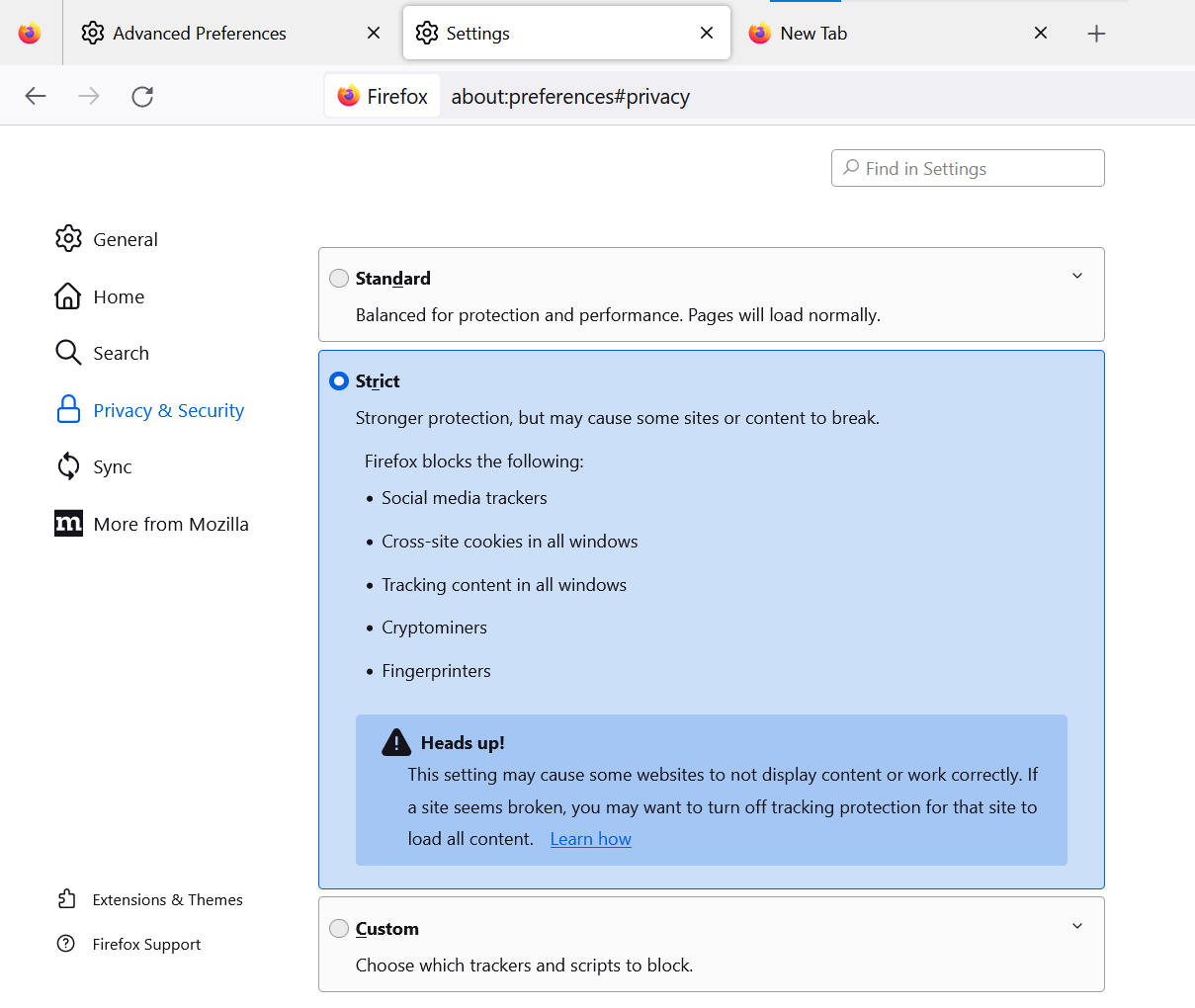
Mozilla Firefox Privacy Settings
Advanced users can further strengthen privacy by entering about:config in the address bar and modifying several key settings:
- Set privacy.resistFingerprinting to True : This Tor-inspired setting helps shield your browser from fingerprinting attempts.
- Set webgl.disabled to True : Disables the WebGL API, reducing hardware-based fingerprinting.
- Set media.peerconnection.enabled to False : Disabling WebRTC hides your real IP address, even when using VPNs.
- Set geo.enabled to False : Disables location services, preventing geo-location-based tracking.
- Set privacy.firstparty.isolate to True : Restricts cookies to their originating website, blocking cross-site tracking.
Alternatively, you may use a pre-configured user.js profile, such as the one maintained by ghacks, for an enhanced and up-to-date privacy experience.
Opera
Opera features built-in privacy tools—including an ad blocker and free VPN—and enables you to easily opt out of tracking. Access “ Settings ” > “ Privacy Settings ” to review and apply options that improve your privacy and reduce fingerprinting exposure.

Opera Browser Privacy Settings
Brave
Brave prioritizes privacy and actively combats fingerprinting through two main strategies:
- Standardizing or randomizing API values so Brave instances appear identical to each other.
- Employing per-session and per-site randomization to make tracking far more difficult.
These approaches reduce the effectiveness of fingerprinting by preventing unique tracking signatures. You can easily access privacy settings by typing “ brave://settings/privacy ” in the Brave address bar. Brave also offers a built-in VPN and Tor functionality for users seeking maximum privacy.

Brave Browser Privacy Settings
Brave also features integrated Tor browsing , accessible within the privacy settings for enhanced anonymity.

Brave and Tor Browser Coordination
Apple Safari
Safari offers strong privacy measures by default. Its Intelligent Tracking Prevention automatically blocks sites not visited for over 30 days and rejects various tracking mechanisms—including some fingerprinting techniques—without compromising user security.
- Go to the Safari menu, select “ Settings “, and open the “ Privacy ” tab.
- Check options for: Prevent cross-site tracking Hide IP Address Block All Cookies

Apple Safari Privacy Settings
Selecting these options strengthens your defenses against fingerprinting and improves overall privacy while using Safari.
Other Methods to Hide Browser Fingerprint
Beyond browser-specific modifications, there are additional strategies to further reduce the risk of browser fingerprinting.
2. Use the Incognito Mode of the Browser

Activate your browser’s private or incognito mode when browsing sensitive topics. This mode minimizes the storage of browsing data and cookies, helping reduce the surface area for fingerprinting and persistent tracking. Keep in mind that incognito mode does not make your fingerprint identical to other users, but it does offer enhanced privacy for session data.
3. Browser Extensions and Add-ons
Specialized browser plug-ins can further protect against fingerprinting—however, exercise caution when choosing extensions. Only install add-ons from reputable sources, as malicious or poorly designed add-ons can both expose your data and increase your fingerprint’s uniqueness.
Popular anti-fingerprinting extensions include:
- Canvasblocker by kkapsner : Defends against canvas fingerprinting ( GitHub ).
- Trace by AbsoluteDouble : Blocks traditional and advanced fingerprinting ( GitHub ).
- Chameleon by sereneblue : Spoofs user agents and randomizes browser attributes ( GitHub ).
While using user-agent spoofing add-ons can help complicate fingerprinting, be mindful that erratic or highly unique fingerprints can also make you stand out. Consider extensions that cycle fingerprints periodically for added privacy.
4. Disable JavaScript
Disabling JavaScript prevents websites from collecting detailed information about your browser plugins, fonts, and hardware. This can serve as an effective defense against many fingerprinting methods.
However, disabling JavaScript may impair functionality on many websites. Consider using NoScript or similar tools to selectively enable JavaScript on trusted sites while blocking it elsewhere. This approach requires ongoing management but offers granular control over your exposure.
5. Use A VPN Service

A Virtual Private Network (VPN) increases your privacy by masking your IP address and encrypting your network traffic. This does not completely eliminate fingerprinting, but it prevents third parties—including ISPs and malicious websites—from connecting your browsing activity to your real-world identity and location.
6. Disable Flash

Flash is obsolete and poses unnecessary privacy risks. If you have Flash installed, disable or uninstall it—as modern browsers no longer support it as of late 2020. Eliminating Flash closes another fingerprinting avenue and strengthens your privacy even further.
7. Use Tor Browser

The Tor Browser , built on Mozilla Firefox, is engineered for maximum anonymity and privacy. It routes your online activity through multiple nodes worldwide, making it extremely difficult to link your web activity back to your real identity.
Tor comes with essential privacy features, such as HTTPS Everywhere , NoScript , and built-in anti-fingerprinting protections, blocking techniques like Canvas and WebGL fingerprinting by default. For best results, use the browser’s default settings and avoid unnecessary plugins or modifications.
8. Virtual Machines

Virtual Machine |Spiceworks
For those with higher privacy needs, using Virtual Machines (VMs) provides a highly secure environment for browsing. Tools like VirtualBox enable you to run isolated Linux VM instances, protecting your host machine and making it easy to erase and reset the environment if it is ever compromised.
Using VMs can anonymize your browsing by isolating sessions, running multiple operating systems, and layering VPNs for additional privacy. This approach is particularly valuable for advanced users who require robust anonymity or want to test websites with different setups.
Important: For Smartphone Privacy
Future Trends and Challenges in Browser Fingerprinting
Browser fingerprinting techniques are rapidly advancing and will only become more sophisticated with time, especially as the capabilities of Artificial Intelligence (AI) expand. Staying informed and proactive is essential in this evolving landscape.
Evolving Techniques of Browser Fingerprinting
Browser fingerprinting methods are continuously being refined as both attackers and defenders adapt to emerging technologies and regulations.
Using AI Techniques

AI Can be Used for Browser Fingerprinting |Tech Talks
AI-powered algorithms are making fingerprinting more precise. By analyzing larger and more complex data sets, AI can identify subtle patterns in browser behavior that create even more distinctive digital profiles, increasing the challenge for privacy-conscious users.
Evolution of Browsers
As browsers and web standards evolve, new opportunities for fingerprinting emerge, such as with WebRTC and WebGL . Privacy professionals must continuously adapt their defenses to keep pace with these technological developments.
Countermeasures to Protect Against Advanced Fingerprinting Methods
Future countermeasures may leverage emerging technologies, regulatory changes, and new privacy tools. Staying updated with best practices and utilizing privacy-focused software will remain critical.
Use of AI
AI can also be harnessed to develop anti-fingerprinting solutions that detect and neutralize tracking techniques. Such tools may analyze browser behavior in real-time, autonomously adjusting privacy settings or creating synthetic profiles to undermine fingerprinting accuracy.
Regulatory Frameworks

Laws Can Help Improve Browser Fingerprinting Concerns | Pixabay
Newer Tools
Expect continued development of anti-fingerprinting browser extensions, advanced privacy controls, and customizable settings. Features like improved cookie management, advanced tracking prevention, and machine learning–based privacy solutions will continue to help users defend against new fingerprinting tactics.
