Syslog (System Logging) protocol is a communication standard used by devices in a network to log different kind of events like a change in VPN connection, initiation of an IP connection, or detection of a malicious file. It then becomes the work of the Network administrator to go through the log files trying to find any discrepancies that may indicate a problem in the network. As you can imagine it would take a lot of time to go through each device’s logs individually especially if it’s a large network. And even then the chances of missing an important message are very likely. Which is where the Syslog server software come in.
How Do Syslog Softwares Work?
Syslog softwares are installed or configured onto a server to eliminate the need to log into each device individually when getting their log events. Instead, all the devices will now send their log files to the Syslog server software from where the network admin can study them. And it gets better. The Syslog softwares also feature an alert mechanism that notifies you whenever there is a critical message that needs your immediate attention.So you end up working less but with better results.
Some Syslog servers can also act as receivers for SNMP trap which is another communication standard used by network devices to send alerts to a server. However, SNMP is limited in its scope in that it will only notify you of critical conditions, unlike Syslog which collects every event thus making it more effective for higher detailed monitoring.
Limitations of the Syslog Standard
One downside of the Syslog standard is the lack of authentication which makes them prone to replay attacks although that should not be much of a problem in a secure network. Also as you might already be aware, window-based devices do not support Syslog by default. Instead, they have an event log that can be accessed through Event viewer application that comes with the Windows OS. Therefore, if you have windows based devices on your network that you want to incorporate to your centralized logging system, you might have to use dedicated software like SolarWinds Event Log Forwarder for Windows. Its a software that forwards the event logs as Syslog messages to the Syslog server software.
But enough of that. Let us look at what really brought you here. The best Syslog Server software. As you might imagine there are so many of them. So I will do you a favor and narrow it down to five of the best.
| # | Name | OS | Automatic Alerts | SNMP Support | TCP Support | Download |
|---|---|---|---|---|---|---|
| 1 | SolarWinds Kiwi Syslog Server | Windows | Download | |||
| 2 | WhatsUp Gold Syslog Server | Windows | Download | |||
| 3 | Visual Syslog Server | Windows | Download | |||
| 4 | Syslog Watcher | Windows | Download | |||
| 5 | The Dude Syslog Server | Windows | Linux | MacOS | Download |
| # | 1 |
|---|---|
| Name | SolarWinds Kiwi Syslog Server |
| OS | Windows |
| Automatic Alerts | |
| SNMP Support | |
| TCP Support | |
| Download | Download |
| # | 2 |
|---|---|
| Name | WhatsUp Gold Syslog Server |
| OS | Windows |
| Automatic Alerts | |
| SNMP Support | |
| TCP Support | |
| Download | Download |
| # | 3 |
|---|---|
| Name | Visual Syslog Server |
| OS | Windows |
| Automatic Alerts | |
| SNMP Support | |
| TCP Support | |
| Download | Download |
| # | 4 |
|---|---|
| Name | Syslog Watcher |
| OS | Windows |
| Automatic Alerts | |
| SNMP Support | |
| TCP Support | |
| Download | Download |
| # | 5 |
|---|---|
| Name | The Dude Syslog Server |
| OS | Windows | Linux | MacOS |
| Automatic Alerts | |
| SNMP Support | |
| TCP Support | |
| Download | Download |
1. SolarWinds Kiwi Syslog Server Free Edition
As a network admin, you have probably heard of SolarWinds. They are best known for their industry-leading Network Performance Monitor but they also have a bunch of other IT management software and monitoring tools one of which is Kiwi Syslog Server free edition. It is an excellent tool that will collect Syslog messages from any device in your network that supports the Syslog protocol. The Kiwi Syslog server is very easy to install and configure and also comes with the ability to receive SNMP message.

Kiwi Syslog Server
The Syslog data received can be viewed through the server’s User interface or sent directly to you through the email. A notable feature of the Kiwi server is the ability to create a trend analysis graph from the logged events which definitely makes for easier monitoring.
SolarWinds has put various measures that allow you to access specific logs in the least time. For instance, you can open multiple instances of the log data and view them concurrently. It also allows sorting through the log files based on time or priority level. Unfortunately, this free version comes with a limitation in that it can only support 5 devices.
Therefore, for the bigger organizations, I would recommend the paid version that comes with a bunch of excellent stuff among them being a web-based console that allows you to study the logs remotely from any system. The KIWI Syslog server only works for the Windows operating system.

2. WhatsUp Gold Syslog Server
This software was developed by IPSwitch, another popular developer of Network Monitoring tools and it provides an effective way to receive, save and share Syslog data from various devices on your network. The WhatsUp Gold Syslog server allows you to view the log messages live as they are received and also sort them to appear based on their importance.

WhatsUp Gold Syslog Server
It also allows you to set the type of events that trigger an alert which will promptly be sent to you as messages. With the ability to handle 6,000,000 messages per hour, this server tool is well suited for use in any organization size. All the collected Syslog messages are archived which means you have a history of all the logged files in case you need them in the future.
Additionally the WhatsUp server allows forwarding of the log messages to a third-party application for in-depth monitoring. This server is only compatible with windows and can either run as an application or as a server.

3. Visual Syslog Server
Visual Syslog Server is an open source software that allows monitoring of devices via both UDP and TCP. The server allows you to view the messages in real time as they come after which they are saved on the disk for better management.
For easy retrieval of logs from the database, the server allows you to filter them based on various aspects like the date, source address, facility, or message content. In addition to the standard email alerts, the Visual Syslog Server supports notification through displaying an alarm window, playing a sound file and customizable notices formats.
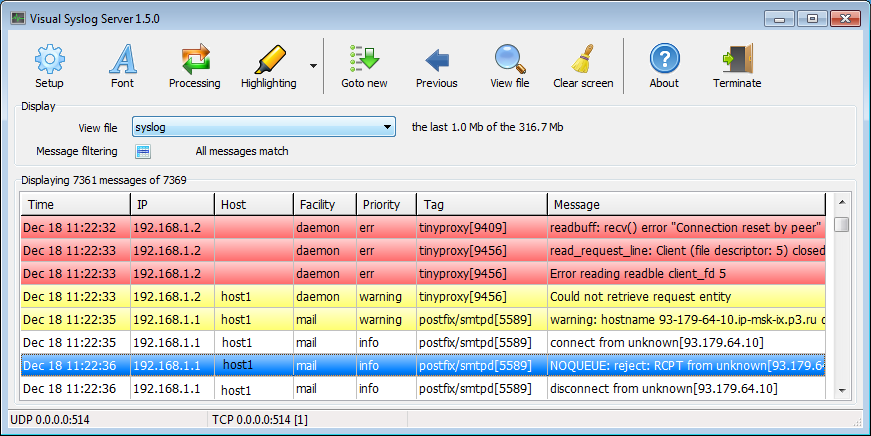
Visual Syslog Server
There is definitely no way you will miss an alert with so many available options. But even if you do, this server can be set to trigger external scripted programs act on your behalf in case of an alert. Although this server runs as an application, it is very lightweight and does not take too much system resources. It can also be minimized to the tray when not in active use to avoid disturbing your workflow. It will still continue collecting logs in the background.

4. Syslog Watcher
Syslog Watcher is another excellent software for managing log events that features a multi-threaded architecture for enhanced performance. Multi-threaded means the process of collecting logs and processing them is different and therefore, one does not interfere with the other. Ad a result, you are assured that all events from all your devices are logged to the server.
It also supports both IPv4 and IPv6 protocols and can monitor logs over UDP and TCP making it more reliable. Smart parse is another highlight feature of Syslog Watcher that enables it to handle non-Syslog messages. This server has the ability to handle thousands of logs per second and will thus have no problem handling all the devices in your network.

Syslog Watcher
Once the server collects the logs you can either choose to convert them into various file formats like CSV and XML or you can store them in a database by using ODBC connectors. Once in the database, it becomes very easy to manage the data especially with the various search and sorting mechanisms allowed by the server. The server has also incorporated email notifications to alert you in case there is an important event.

5. The Dude Syslog Server
I could think of a better name for a Syslog server but let’s not judge a software by its name, right? The Dude is a full-featured Network Management software that features a built-in Syslog server which can easily be activated on the server settings under the Syslog tab. The Syslog server being part of a larger tool means that you get some benefits that would otherwise be unavailable. Like the automatic detection of devices on your network for instance. Or better yet, the support for SNMP, DNS, TCP, and ICMP monitoring of devices that allow it.

The Dude Syslog Server
Also, unlike the other software that we have looked at so far, this server tool can also work on Linux and MacOS. The log messages collected by the server are either exported to file formats or forwarded to other destination like 3 rd party applications. The Dude Syslog server also incorporates various alert methods like pop up messages, system beeps and screen flashes. That is on top of the usual email alerts.

How to Fix “Printer is in an error state” Issue?
The error “ WinRAR Error: Next Volume Is Required ” usually appears when you’re extracting a multi-part RAR archive and WinRAR can’t find (or can’t correctly identify) the next file in the sequence . This often happens when a volume is missing , stored in a different folder , or renamed in a way that breaks the archive’s expected order .

In this guide, we’ll go over the most reliable fixes confirmed by affected users, along with what each method is doing behind the scenes so you can choose the right one for your situation.
Important: To extract multi-volume archives, you should always start extraction from the first file in the set. This is usually file.part1.rar , or (in older sets) the main .rar file that comes before .r01 , .r02 , and so on.
1. Download and Place the Missing RAR File
WinRAR needs all parts of a multi-volume archive to complete extraction. This error usually appears when one of the volumes in a set like .part2.rar , .r01 , .r02 , .001 , and similar naming formats is missing . Downloading the missing volume and placing it in the same folder as the other parts allows WinRAR to continue extracting normally .
- Look at the error message or review the list of archive parts in the folder.
- Identify which volume is missing (for example, part2.rar , .r02 , .001 , etc.).
- Go back to the website or source where you downloaded the archive.
- Locate and download the exact missing file using the same naming format as the others.
- Make sure the new file name matches the pattern of the rest. Example: If you have file.part1.rar and file.part3.rar , the missing one must be file.part2.rar .
- Move the downloaded missing volume into the same folder as the other archive parts.
- Confirm that all parts are in a single folder before extracting.
- Right-click the first file in the series (usually part1 or the main .rar file) and select Extract Here or Extract to Folder .
- WinRAR should now detect all volumes and continue extraction normally .
2. Manually Browse & Select the Next Volume
Use this method only if the next volume already exists , but WinRAR is failing to detect it automatically. This can happen due to incorrect naming , the file being in a different location , or a temporary file access issue. Manually browsing helps WinRAR locate the correct volume and resume extraction without interruption .
- Right-click the first file in the series (usually .rar or part1.rar ) and select Extract Here or Extract to Folder .
- When WinRAR cannot find the next volume, it will show the “ Next Volume Is Required ” message.
- A small window will appear, allowing you to manually select the next volume .
- Use the file explorer window to locate the folder where the other archive parts are saved.
- Select the next part based on the naming order (example: select file.part2.rar after file.part1.rar ).
- Make sure the selected file matches the naming format of the archive (no extra characters like (1) and no mismatched numbering).
- WinRAR will resume extraction using the selected volume .
- If additional volumes are missing or stored separately, WinRAR may prompt you again. Repeat the same process until extraction completes.
3. Rename the RAR files in Order
WinRAR relies on a proper naming sequence (such as file.part1.rar , file.part2.rar , file.part3.rar ) to extract multi-volume archives. If a file is named incorrectly, contains extra characters, or is out of order, WinRAR may fail to locate the next volume and show this error. Renaming the files correctly helps WinRAR follow the sequence and extract the archive without interruptions .
Note: Renaming only changes the file name , not the file contents. The goal is to restore the correct sequence so WinRAR can detect the next volume.
- Go to the folder where all the RAR files are saved.
- Make sure all parts of the archive are present and stored in the same folder .
- Check how the parts are currently named . Common patterns include:
file.part1.rar, file.part2.rar, file.part3.rar
file.rar, file.r01, file.r02, file.r03
- Look for files that don’t match the expected numbering pattern (for example, file.part01.rar , file.part1(1).rar , or unrelated names).
- Rename each file so it follows the same order without extra characters or mismatched numbering. Example:
Incorrect: file.part1.rar, file.part3.rar, file.part2(1).rar
Correct: file.part1.rar, file.part2.rar, file.part3.rar
- Make sure the text before the number is exactly the same for all files.
- Only the last part number should change.
- Right-click the first file in the series (usually part1.rar or the main .rar file) and select Extract Here .
- WinRAR should now recognize the sequence and continue extraction normally .
If you still get the same prompt: the archive set is likely incomplete (a part was never downloaded or was removed), or one of the volumes is corrupt and must be re-downloaded from the original source.
