The device failure due to the lack of energy is a common problem nowadays. Many times important phone calls are left unattended and we aren’t able to reply to an important conversation which is going on between our colleagues and us, just because of the drainage of our mobile phone battery. Almost every person who possesses a smartphone wishes that he/she should have more battery life. So, keeping this problem under consideration we will design a mobile charging technique using our shoes. This project will not only solve the battery drainage problem but it will also promote health by creating a shoe insole that converts the physical energy created by walking into electricity, which is then stored in a portable battery pack. Along with charging our electronic gadget, we will also be able to renew some of our physical energy too.
How To Assemble Piezoelectric Elements With Other Components?
As we have understood the basic aim of our project, let’s move a step ahead and look out for the required components and then integrate them to design a final prototype.
Step 1: Components Used
- No products found.
- No products found.
- No products found.
- No products found.
- Soldering Iron Kit
- No products found.
- No products found.
- No products found.
- Velcro Strips
- No products found.
- No products found.
Step 2: Understanding the Basic Principle Of The Project
Before assembling the components we need to understand the working mechanism of the project. In every project of electronics, the power supply is the backbone. The main power source that makes this project possible is called a piezoelectric transducer/piezoelectric element. They are comprised of components like crystals and ceramics that have the special ability to convert physical energy into AC electricity. We can make the best use of this property of these elements by putting them underneath our feet in such a way that every time we take a step our weight is used to push the piezoelectric elements, which in turn converts our physical energy into electrical energy. Electrical energy is generated but there is a slight problem, Alternate Current (AC). We need Direct Current (DC) for our project. Hence, this problem will be solved by creating a Bridge Rectifier with diodes so that AC power can be converted into DC power.
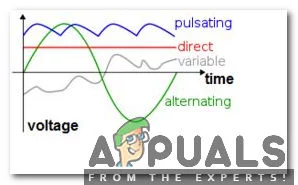
Demonstration Of AC And DC
Step 3: Measuring The Size Of Your Shoe
The first element that we need for designing a piezoelectric generator is the plastic base. Take out the base from the shoe and make appropriate measurements using the architectural scale ruler.
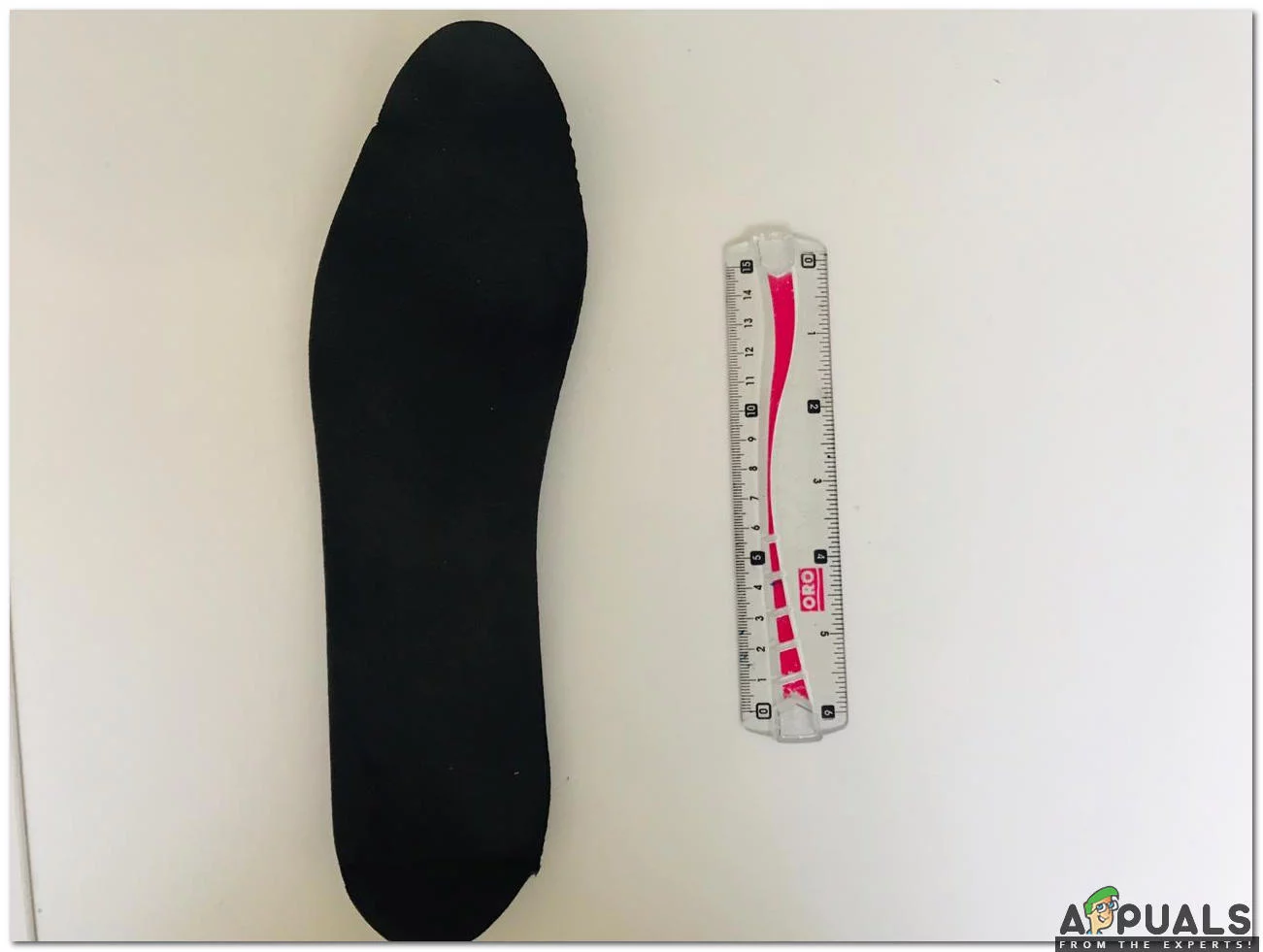
Foot Measurement
The piezo element holes are strategically placed so that they line up with the large indents on the shoe’s insole, which indicate the areas of most pressure.
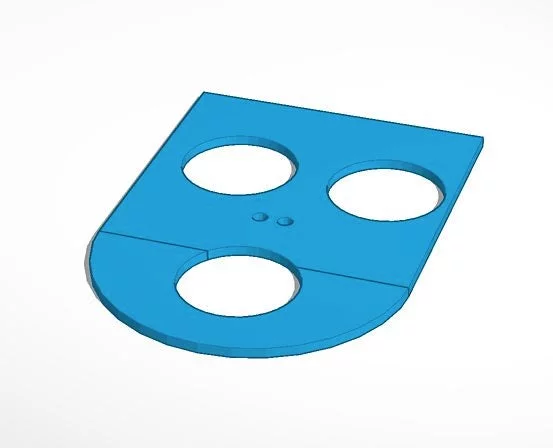
Piezoelectric Shoe Insole (heel)
Step 4: GLUING THE PIEZO ELEMENTS
As we have finished creating the base for our piezoelectric generator, we will paste the piezo elements on base with the help of a hot glue gun. Apply the thin layer of glue around the edge of the hole in the plastic and then quickly press the piezoelectric components on it before it is cooled down. Don’t apply too much glue because in case we do so, we may restrict the foam pads from fully compressing. We will take care of one more thing that the glue doesn’t touch the Positive (RED) and Negative (BLACK) joints because that joints will be soldered later on. We will ensure that the piezo elements are glued on both sides of the plastic. Using a digital multimeter we will make sure that our piezo elements are working.
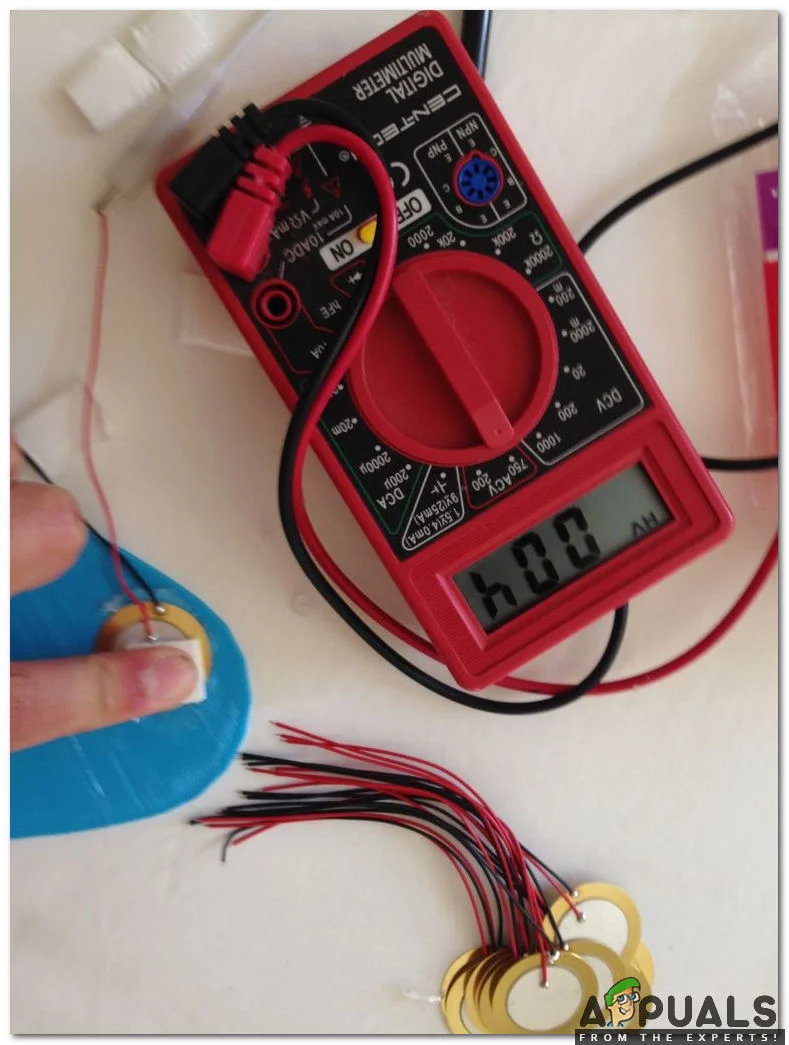
Checking The PiezoElectric Elements
Now, as we have glued all of the piezoelectric elements in their appropriate spots, we will glue the foam pieces onto each piezo element as shown below:
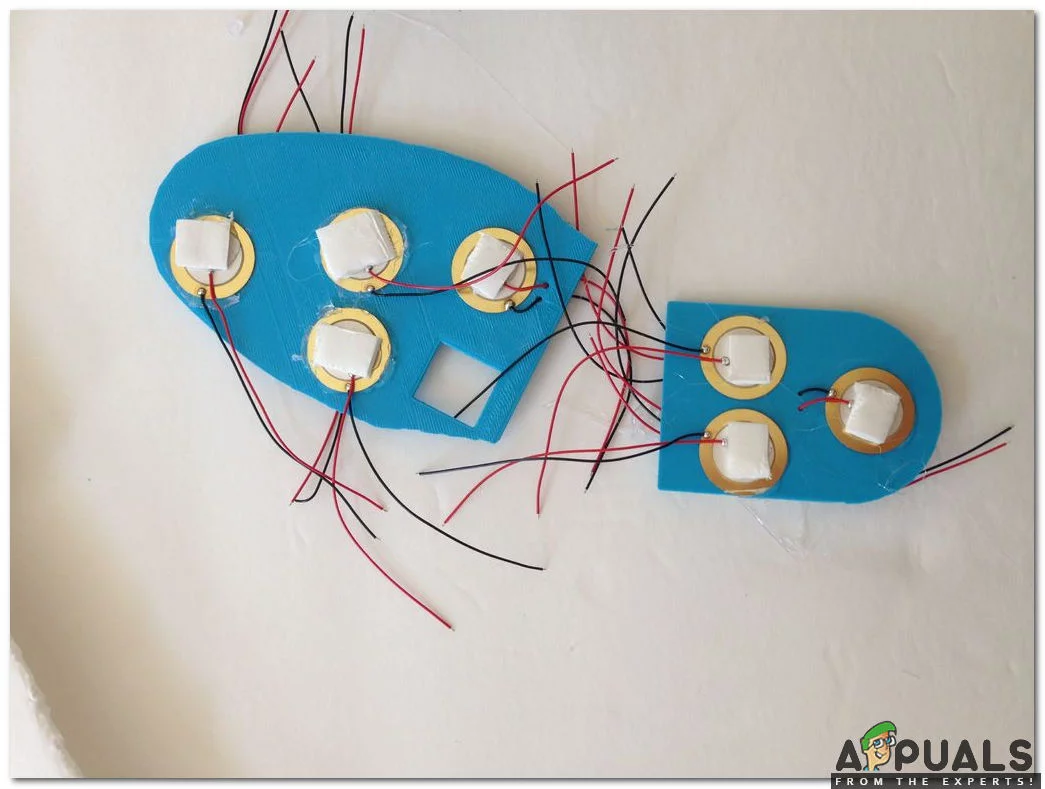
Gluing The Foam Pieces
Step 5: SOLDERING THE PIEZO ELEMENTS TOGETHER
The piezo elements generate ample voltage but they don’t generate considerable current. So, keeping this in view we will wire all the piezo elements in parallel (positives will be soldered with the positive ones and negatives will be soldered with the negative ones). As we have done this we will be able to generate a large number of amperes and our device will be charged faster. After soldering the joints apply the hot glue on the joints as it will prevent the joints from breaking off. We will connect the piezo elements from one side of the plastic to the other by threading the wires of one of the piezo elements through the holes so that they can be soldered in parallel to a piezo on the other side. As all of the piezo elements on the heel are wired in parallel, we will solder the last piezo in the chain to one of the piezo elements on the toe piece, and continue to solder the piezo elements in parallel until all 14 elements are connected.
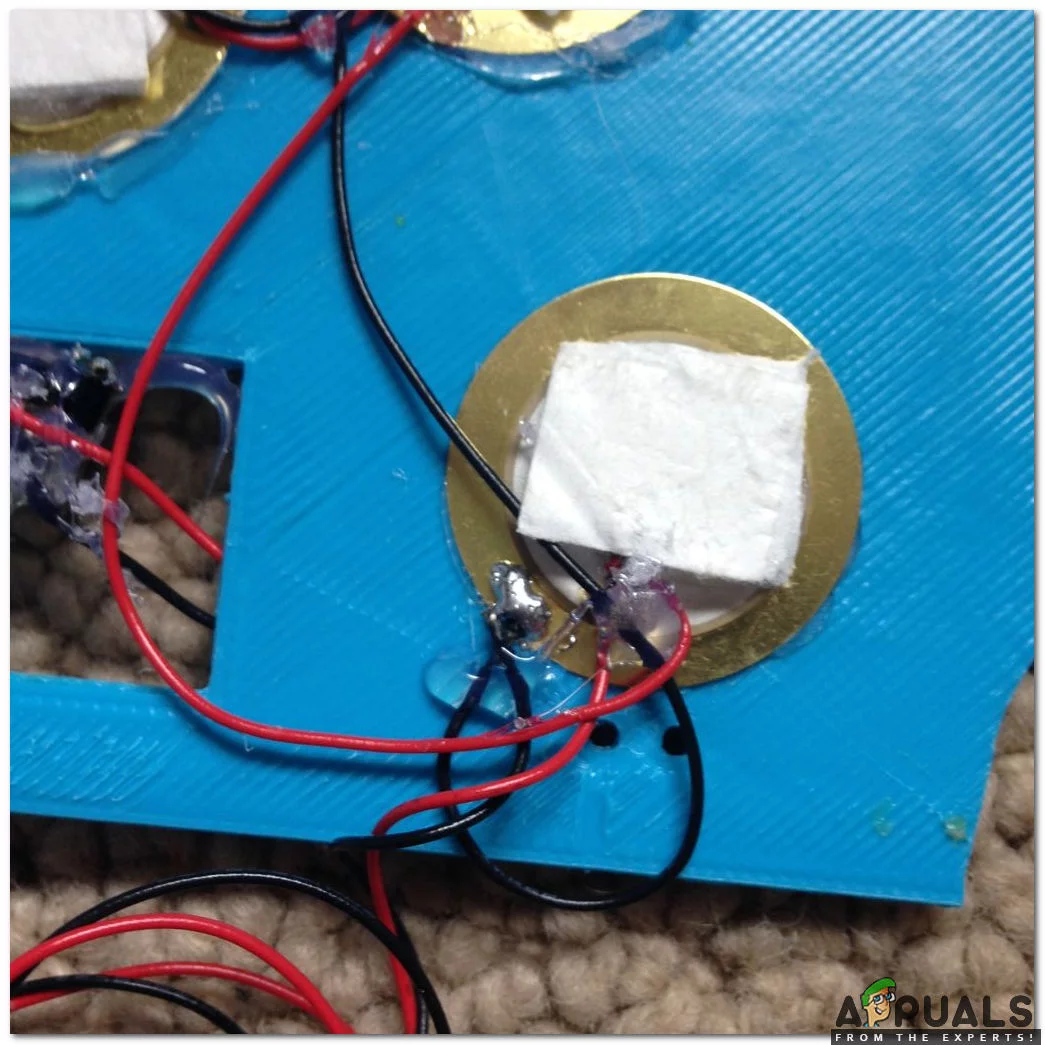
Soldering Piezo Elements
Step 6: Building The Bridge Rectifier
Moving a step ahead, firstly, we will study the circuit diagram of a bridge rectifier, secondly, we will build a bridge rectifier using diodes and finally, we will wire the bridge rectifier.
- Studying The Circuit Diagram: When the voltage is applied to the diodes and they allow the current to pass- through they are said to be in forwarding Biased mode and when the voltage is applied and diodes don’t allow the current to pass-through then they are said to be in Reverse Biased mode. In the circuit diagram is shown below the diodes are connected in forwarding biased mode and they allow the current to pass through them. The positive side of the diode is that side which is painted grey and it will be shown in the next step. Circuit Diagram
- Building The Bridge Rectifier: We will connect diodes according to the forward-biased configuration so, that current can be passed through them. The beginners could follow the diagram shown below to create the bridge rectifier. The bridge rectifier is also known as the Full Wave Rectifier . Bridge Rectifier
- Wiring The Bridge Rectifier: Now, connect the piezoelectric components to the rectifier according to the diagram shown below. The current is AC so, the position of the wires are interchangeable, as long as they connect to the correct diodes in the diagram. Peel the USB cable that you bought with your battery pack and take out the internal wires. We are only interested in RED and BLACK wires. Now, twist the frayed wire strands of each wire and then solder them and also solder the wires to the rectifier. As we know that DC voltage has positive and negative terminals so, after soldering it is better to check polarity. To be on the safer side apply hot glue gun on the terminals. USB Cable attached to the rectifier
Step 7: Installation And Finishing Touches
As we have assembled all of the components and our piezoelectric generator is ready, we will move towards the installation part. Adjust the plastic piezoelectric generator inside the shoe and then insert the original sole on top of it. In case somebody has an issue of adjusting the generator inside he/she can refer to the picture shown below:
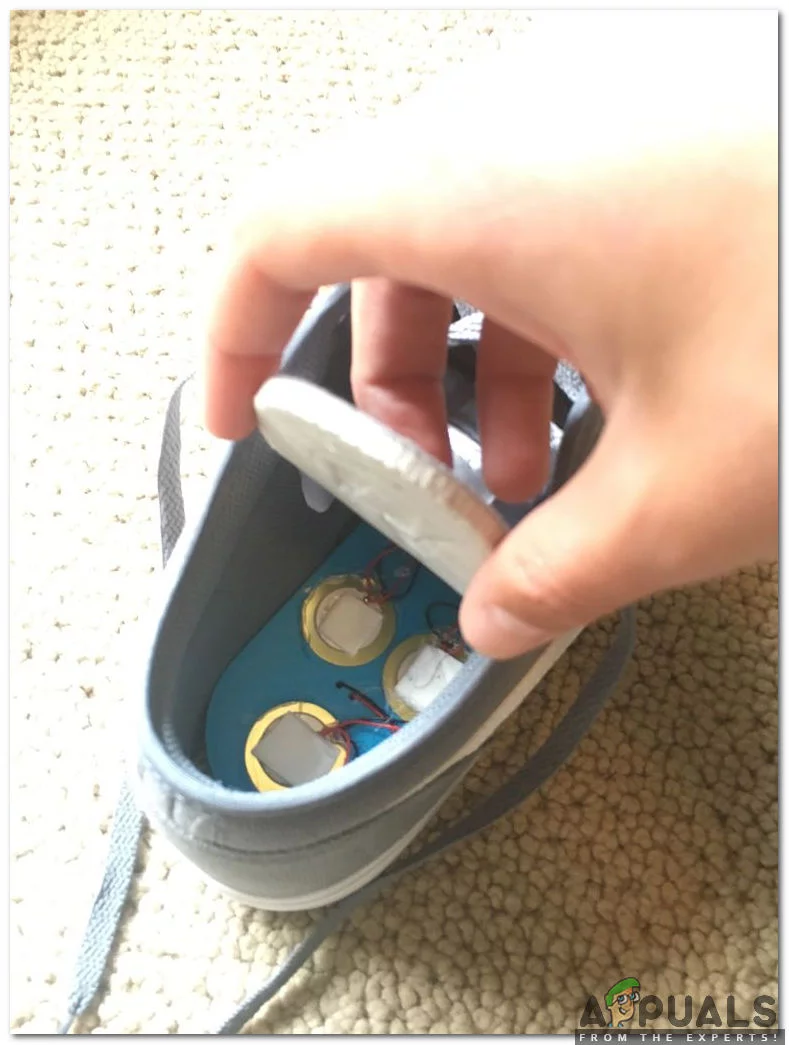
Adjusting The Piezoelectric generator inside the shoe
Take the USB cable wired previously and thread it between the tongue and the outside of your shoe. Now, the battery is left to be mounted and to do so, we will fix it between the tongue of the shoe and laces and then tight the shoe tightly. It is better to use Velcro to fasten the battery pack to prevent the battery from falling out while running. If anyone has a spare shoe then he/she can make a foam cutout from it’s sole and the shoe will rise a little bit.
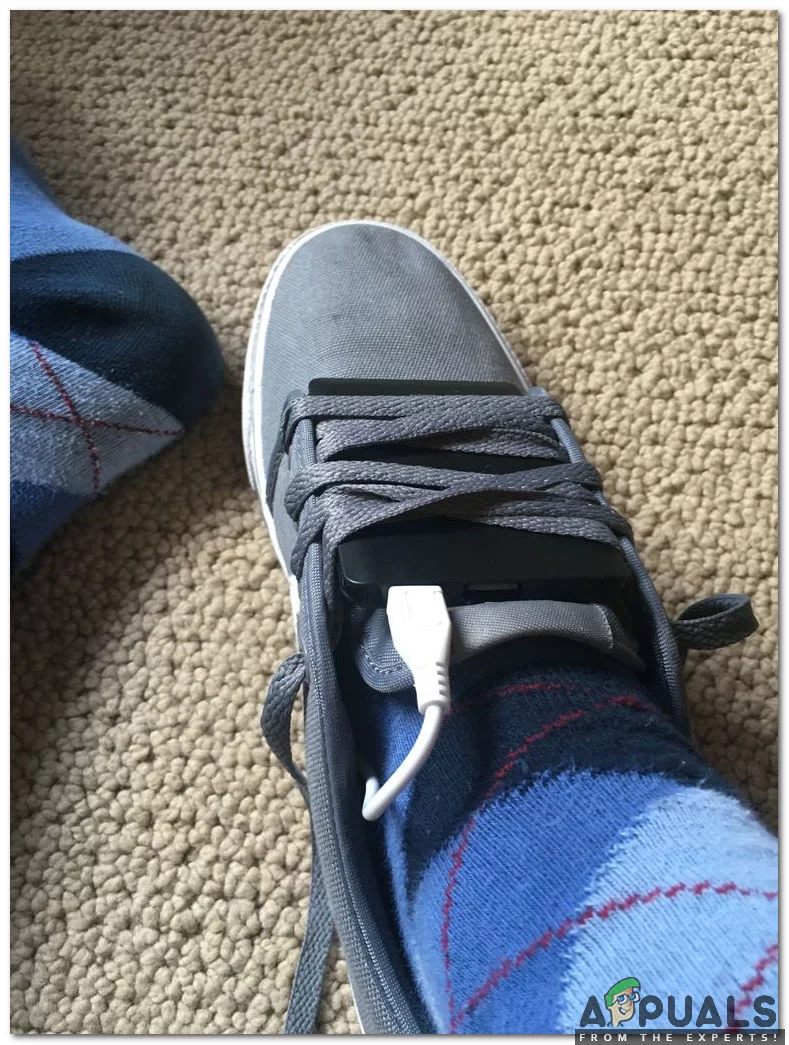
Piezoelectric Shoe
Step 8: Testing
Now, as we have completed the installation part, we should test it, and see whether it’s working or not. To check how well they work we should EXERCISE daily. Play sports every day except for football because your phone can be damaged while hitting the ball from the foot. The battery will charge only whenever we take a step so, as many steps we take our phone is charged more rapidly.

Testing the Prototype
How to Fix “Printer is in an error state” Issue?
- Recognizing the importance of a printer’s duty cycle is crucial for choosing a device that matches your print volume needs. Staying within this limit ensures the printer operates efficiently and prolongs its lifespan, minimizing the risk of maintenance issues.
- Proper humidity, temperature, and cleanliness management can significantly enhance printer performance and maintain its duty cycle, preventing unnecessary wear.
- Enhancing a printer with upgrades like additional memory or better mechanical parts can improve its workload handling and extend its practical duty cycle, boosting overall durability and efficiency.
When choosing a new printer, you might come across the term “ duty cycle ” in the specifications. This guide will explain what a duty cycle is, why it matters, and how it can help you choose the right printer. We’ll keep things simple so you can easily understand how to use this information when shopping for a printer.
- Printer Duty Cycle: What It Means and Why It Matters?
- Why the Duty Cycle Is Key to Choosing the Right Printer?
- Duty Cycle vs. Recommended Monthly Print Volume: What’s the Difference?
- What Happens If You Ignore Printer Duty Cycle Recommendations? ↪ Real-World Scenarios: Why Exceeding the Duty Cycle Can Cost You
Printer Duty Cycle: What It Means and Why It Matters?

What is the meaning of Printer Duty Cycle?
The printer duty cycle represents the upper limit of a printer’s capacity—how many pages it can reliably process in a month before the risk of wear or malfunction increases. This figure is crucial for understanding printer performance limits and ensuring that your chosen printer can handle the expected work volume.
Manufacturers determine a printer’s duty cycle through stress testing, where the printer is pushed to its limit to identify how many pages it can produce each month before malfunctioning. These tests help set a reliable performance gateway for users.
A printer’s duty cycle is like a car’s speedometer—you wouldn’t drive a car at top speed all the time, and you shouldn’t push a printer to its maximum duty cycle. Doing so can lead to quicker wear and tear, more frequent maintenance, and a shorter lifespan.
If you’re unsure whether to choose an inkjet or laser printer, this detailed guide compares both options to help you make an informed decision.
Why the Duty Cycle Is Key to Choosing the Right Printer?

The Importance of Duty Cycle in printer selection
Knowing the duty cycle is essential when choosing a printer, as it determines how well the device can handle your monthly print volume without excessive wear or maintenance.
Here is why the duty cycle matters in printer selection:
- Fit for purpose: Selecting a printer with a suitable duty cycle ensures it can handle your monthly printing volume efficiently, reducing stress on its components.
- Longer lifespan and better performance: Staying within the duty cycle ensures optimal print quality and speed while prolonging the printer’s life, avoiding frequent breakdowns.
- Cost efficiency and reduced downtime: Operating within the duty cycle minimizes the need for repairs and reduces operational disruptions, managing long-term costs.
Duty Cycle vs. Recommended Monthly Print Volume: What’s the Difference?

Duty Cycle vs. recommended monthly print volume
The recommended monthly print volume is the optimal number of pages a printer should handle each month for the best performance and longevity. Unlike the maximum capacity indicated by the duty cycle, this number guides regular usage, ensuring the printer operates efficiently without excessive wear.
If your print volume regularly exceeds the recommended amount but stays within the duty cycle, the printer may operate safely in the short term, but it could still experience accelerated wear and reduced lifespan over time.
In such cases, consider upgrading to a higher-capacity printer or spreading print jobs across multiple devices to ensure long-term performance.
Here are the differences between the duty cycle and recommended monthly print volume:
- Duty cycle: Represents the maximum number of pages a printer can handle in a month without breaking down. It assesses the printer’s upper limit.
- Recommended monthly print volume: Suggests a practical, workable number of pages to print each month to keep the printer in good condition over its lifespan.
What Happens If You Ignore Printer Duty Cycle Recommendations?

Consequences of ignoring Duty Cycle recommendations |AndranikHakobyan via Canva
Ignoring the duty cycle limits poses more severe risks than exceeding the recommended monthly print volume, leading to serious long-term consequences.
While exceeding the recommended volume occasionally may result in additional wear and tear, consistently exceeding the duty cycle can lead to frequent breakdowns, reduced performance, and a shortened lifespan.
Ignoring duty cycle limits leads to frequent breakdowns, reduced performance, and increased maintenance, ultimately shortening the printer’s lifespan and causing more frequent operational downtime and higher repair costs. Long-term, pushing a printer beyond its limits leads to greater financial burdens due to premature replacements and inefficiencies.
↪ Real-World Scenarios: Why Exceeding the Duty Cycle Can Cost You
For example, in a busy law firm, overlooking duty cycle limits during a high-stakes period could cause a printer breakdown just before a critical deadline, delaying crucial legal filings and ultimately compromising client service.
For small businesses, consistently exceeding a printer’s duty cycle can lead to costly emergency repairs or premature equipment replacements, straining financial resources.
