If you’re a gamer, you’re likely familiar with Discord for your gaming connections and communication. When you are on the server’s typing interface, however, sometimes you need a little more than plain text to get your message across. Those who are new to Discord may see some of the veterans typing in bold characters, italicized ones, words stricken through, and text in multiple colors. This guide will break down how to do all those things to join the ranks of the more experienced Discord users.
These formatting techniques are not that tough to do but until they become first nature, you may have to constantly refer back to them to know how to do certain things. You can bookmark this article, take some screenshots, or jot these basic things down somewhere. The text formatting we’re about to get into relies upon the built-in text manipulation allowed in the Markdown markup language.
Getting Familiar With The Basics
Going in, familiarize yourself with some of the mighty characters that make these text formatting manipulations possible. Scavenge your keyboard to find your short cut for the asterisk symbol ( * ), the underscore symbol ( _ ), the tilde symbol ( ~ ), the tick or backtick symbol ( ` ), and the backslash symbol ( \ ). On a standard US qwerty keyboard layout, these can be found on the following keys:
- Asterisk: [SHIFT] + [8] — the number 8 key
- Underscore: [SHIFT] + [-] — on the right side of the number [0] key
- Tilde: [Shift] + [ ` ] — on the left side of the number [1] key
- Tick or Backtick: [ ` ] — on the left side of the number [1] key
- Backslash: [ \ ] — three keys to the right of the [P] letter key or above the [ENTER] key
Bold Text
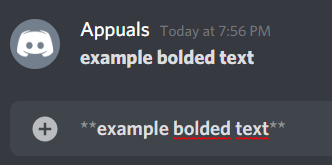
This image shows text that has been bolded on Discord.
To bold your words or phrases, surround the text with two asterisk symbols on either side, and hit enter. Do not add any space between the two asterisk symbols, both among them or the between them and the starting or ending character of the text.
Example: example bolded text
Italicized Text
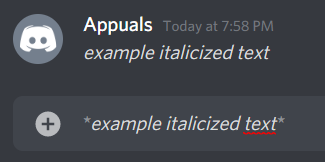
This image shows text that has been italicized on Discord.
To italicize your words or phrases, surround the text with a single asterisk symbol on either side and hit enter. Do not add any space between the asterisk symbol and the starting or ending character of the text.
Example: example italicized text
Underlined Text
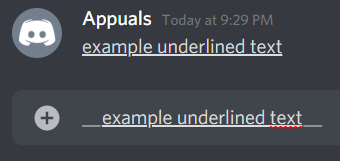
This image shows text that has been underlined on Discord.
To underline your words or phrases, surround the text with two underscore symbols on either side and hit enter. Do not add any space between the two underscore symbols, both among them or between them and the starting or ending character of the text.
Example: example underlined text
Stricken Through Text
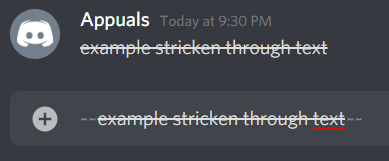
This image shows text that has been stricken through on Discord.
To strike through your words or phrases, surround the text with two tilde symbols on either side and hit enter. Do not add any space between the two tilde symbols, both among them or between them and the starting or ending character of the text.
Example: example stricken through text
Getting Fancy With Multiple Commands
If you want to combine some of the formatting options discussed above, these are the general rules you will have to follow in the cases outlined below.
Bold & Italicized Text
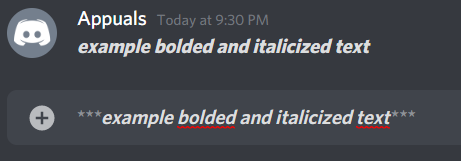
This image shows text that has been bolded and italicized on Discord.
To simultaneously bold and italicize your words or phrases, surround the text with two asterisk symbols for the bold command and add a third asterisk symbol for the italicize command. Hit enter. Do not add any space between the three asterisk symbols, both among them or between them and the starting or ending character of the text.
Example: example bolded and italicized text
Bold & Underlined Text
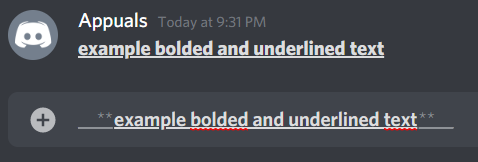
This image shows text that has been bolded and underlined on Discord.
To simultaneously bold and underline your words or phrases, surround the text with two asterisk symbols for the bold command and add two underscore symbols for the underline command. The underscore symbols should be at the outsides of the text and the asterisk symbols should be at the insides of this outer casing. Hit enter. Do not add any space between the asterisk and underscore symbols, both among them or between them and the starting or ending character of the text.
Example: example bolded and underlined text
Underlined & Italicized Text
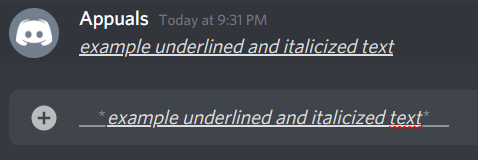
This image shows text that has been underlined and italicized on Discord.
To simultaneously underline and italicize your words or phrases, surround the text with a single asterisk symbol for the italicize command and add two underscore symbols for the underline command. The underscore symbols should be at the outsides of the text and the asterisk symbol should be at the insides of this outer casing. Hit enter. Do not add any space between the asterisk and underscore symbols, both among them or between them and the starting or ending character of the text.
Example: example underlined and italicized text
Bold, Underlined, and Italicized Text
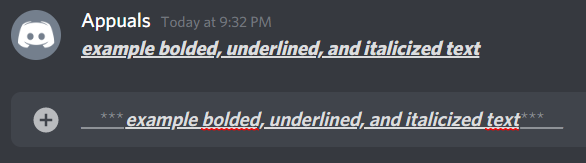
This image shows text that has been bolded, underlined, and italicized on Discord.
To simultaneously perform all three commands: bold, underline, and italicize your words or phrases, surround the text with three asterisk symbols (two for the bold command and one for the italicize command) and add two underscore symbols for the underline command. The underscore symbols should be at the outsides of the text and the asterisk symbols should be at the insides of this outer casing. Hit enter. Do not add any space between the asterisk and underscore symbols, both among them or between them and the starting or ending character of the text.
Example: example bolded, underlined, and italicized text
Returning To Plainer Roots
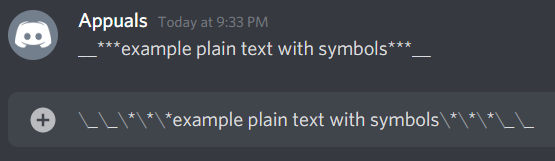
This image shows text that uses command symbols but escapes the command actions on Discord.
What if you just want to send some asterisks, underscores, or tilde symbols without them turning into bold, italicize, underline, or strike through commands? To do this, add backslashes before each of these symbols to prevent them from turning into commands. The backslash behaves as an escape symbol. Once again, do not add any space between the symbols or the backslashes.
Example: __***example plain text with symbols***__
Coloring Text
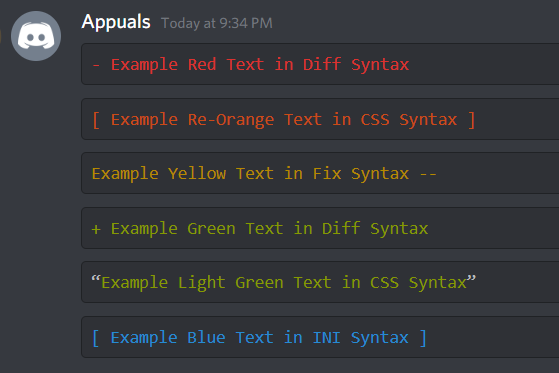
This image shows all of the colored Discord texts outlined on the left.
To color your text, you’ll have to use the tick or backtick symbol ( ` ). Look ahead for the combinations of ticks and dashes needed for the different color schemes
Red (Diff Syntax)
“diff – Example Red Text in Diff Syntax “
Red-Orange (CSS Syntax)
“css [ Example Re-Orange Text in CSS Syntax ] “
Yellow (Fix Syntax)
“fix Example Yellow Text in Fix Syntax — “
Green (Diff Syntax)
“diff + Example Green Text in Diff Syntax “
Light Green (CSS Syntax)
“css “Example Light Green Text in CSS Syntax” “
Blue (INI Syntax)
“ini [ Example Blue Text in INI Syntax ] “
Other Features
There are several more things you can do to your text on Discord . For example, you can create bulleted lists, tables, block quotes, and even add images in line.
Bullet Point Lists
To create a bullet point, type in the following syntax:
⋅⋅* You can use this combination of symbols. * You can use a single asterisk with a space. – You can use a dash symbol with a space as well. + You can also use a plug sign with a space too.
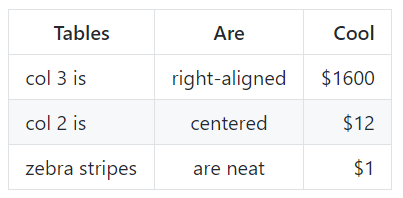
This image shows a table created.
Tables
| Tables | Are | Cool | | —————– |:—————-:| ———:| | col 3 is | right-aligned | $1600 | | col 2 is | centered | $12 | | zebra stripes | are neat | $1 |

This image shows text that has been put forward as a block quote on Discord.
Block Quotes
For block quotes, use the symbol shown on the left.
This image shows an image inserted in line on Discord through an image hyperlink.
Images
To add images in line, use the following text for inline-style:

Final Thoughts
The syntax above summarizes many of the things you can do on discord to customize your text. There are more technical customizations you can perform beyond this which can be found in the markdown markup language’s guide . This article, however, guides you with the most common text customizations as well as some additional features.
