There is no denying how important a tool the Password managers are. And yet not as many people have embraced them. While it’s true that many people remain largely unaware of the benefits that come with using a password manager there is another group of people who simply don’t trust these software. These people argue that by having all the passwords in one place then it presents a better chance for the hackers to access your private data. Then the other worry is that the password managers vendors may also have access to the saved passwords which would also mean the user data is not at all safe.

Why You Should Trust Your Passwords with Dashlane
Unfortunately, these worries are not baseless. It is possible for rogue vendors to fool users into giving them access to their passwords. Also, if you are using a password manager with weak security measures then hackers can easily gain access to their servers and steal your passwords. This is why it’s important that you don’t just pick any password manager. Don’t be drawn to a password manager just because it is the cheapest. Try and establish the security features included in the software.
There are a number of great Password managers available in the market today but my favorite remains to be Dashlane. Why? Their security policy is ironclad. Which is what I will be discussing today. Where does Dashlane store your passwords and how safe are they from hackers and malicious employees. I have been using Dashlane to manage my passwords for a while now and I have no complains so far. Check out my Full Dashlane review .
Dashlane Security Features
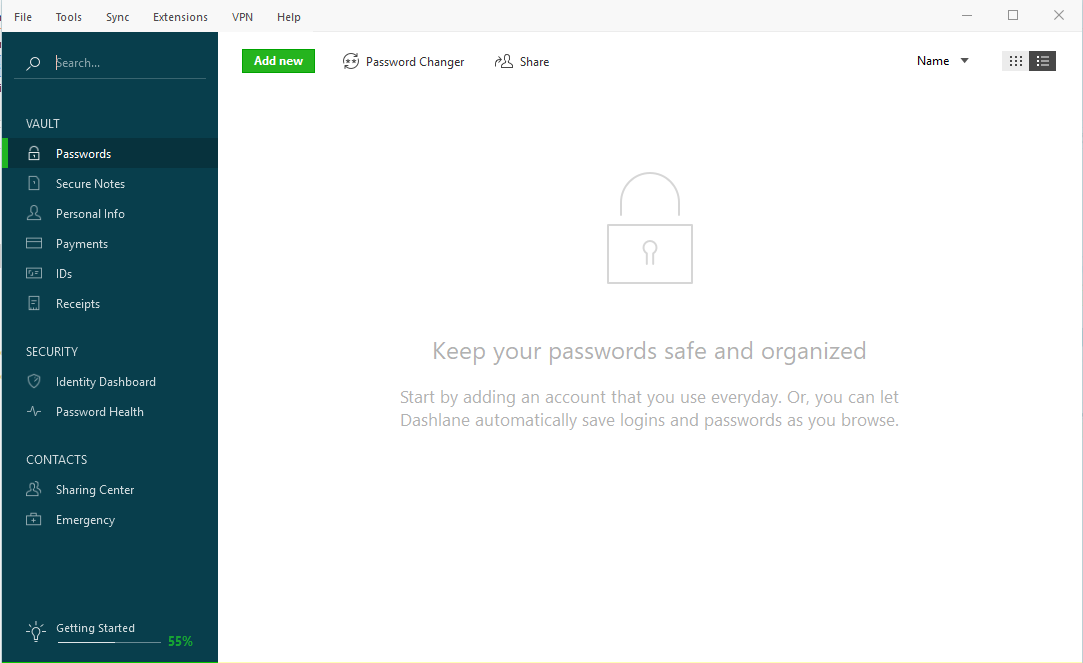
Dashlane
Just like most of the other password Managers, Dashlane stores your password both locally on your device and on their servers. Which is a great thing because you can access your passwords from any device by just logging in to your Dashlane account. But then by having your passwords on the Cloud then that makes them more accessible to hackers. So what makes Dashlane so secure?
Zero-Knowledge Architecture
In my opinion, this is the best security move ever made by Dashlane. They have absolutely no access to the user data. And the way they implement this is by having the user create a master password that is neither stored on the server nor locally on the user PC. To ensure that you set the strongest password Dashlane enforces some rules that you need to follow. The password should be less than 8 characters long and should contain at least one uppercase, one lowercase, and one number. Which is a general rule that you should follow even when setting passwords for your other accounts.
Dashlane then uses this password to encrypt all your other data that is stored in their database. But the original value of your password is still not strong enough for use in encryption and would only guarantee a small level of security. Hackers can still perform a Brute Force Attack by running a script that tries several combinations of your username and password until they get it right. Dashlane understands this and so they use a Key Derivation Function (KDF) that derives a cryptographic key from your master password. The resulting key is known as a Hash Value
The use of KDF to Generate a Hash Value from your Master Password
The concept of Hash key generation may a bit complex so I am going to using a very basic hashing program called SHA-256 to demonstrate how it works. Let’s assume that your master password is Pass@Dash123. When you run this through SHA-256 then the result is a 256-bit hash value that looks like this. “424a0cf66873f76f06459cc0a6e438c9502a4e3e00fa47dafdae6b84272e4932.”
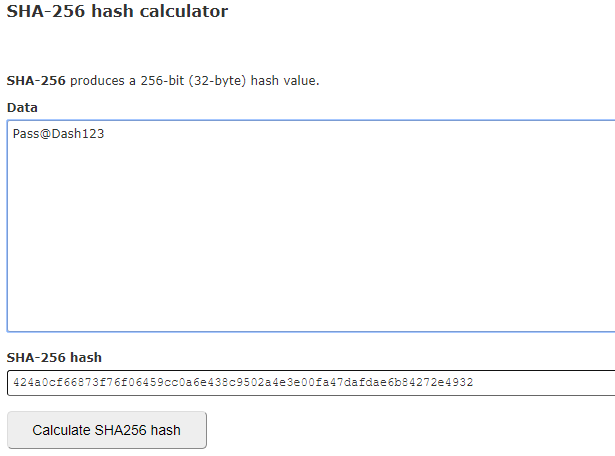
How Password Hashing Works
This is the value that will then be used to encrypt your data. And the reason its perfect is that it is impossible to reverse engineer the hash value to get the original password. Note that SHA-256 is a very simple tool and does not come close to matching the PBKDF2 derivation function used by Dashlane.
The Master Password is not Transmitted over the Internet
In another move to protect your Master Password, Dashlane does not transmit it over the internet. This would make it easy for hackers to intercept it before it is hashed. Instead, Dashlane conducts the password check locally on your computer. Only after it is confirmed will it be used to decrypt your user files.
You should also know that the master password is not recoverable. Dashlane has no knowledge of your password and they do not request that you add any hints that may be used to help you remember your password. You can still create a new password but it cannot decrypt your passwords since they were encrypted with a different key.

Dashlane is hosted on Amazon AWS
The AWS is a comprehensive cloud platform that easily passes as one of the best Cloud Computing Services. Therefore, the fact that Dashlane chose to host their servers on AWS is reassurance in itself. The cloud platform already has layers of security features and is always being monitored 24-7-365. Couple that with the various security features from Dashlane and you get why I am saying this password manager is iron-clad.
Dashlane has a Built-In VPN
This is an extra feature by Dashlane that will be particularly helpful for those that do not have a dedicated VPN software. The Dashlane VPN will add an extra layer of protection when you are browsing on public or untrusted Wi-Fi networks.
The Key Takeaway
So that’s the key breakdown of the Dashlane security feature and my main reason for trusting the password managers with my passwords. Does this mean that Dashlane cannot be hacked? Absolutely not. Hackers are always looking for security loopholes that they can exploit to breach systems. And Dashlane even acknowledges that they too can be victims of a cyber-attack or a rogue employee. So they employ white hat hackers. To try and find the loopholes before the attackers can. Nonetheless, even in the event, their servers are breached, the numerous safety precautions in place will ensure that the hackers cannot access any meaningful information.
What is stored on the Dashlane servers and also on your PC is a bunch of scrambled data that can only make sense through decryption. A process that requires your master password. And so you see why you need to make your password really strong.
Revoking A Device’s Access to your Dashlane Account
With everything that’s been said it now follows that the only way anybody can access your passwords is if they have your username and master password and use the details to log in to your Dashlane account. Or if they have access to your mobile device while you are logged in to your account. So in the event that you lose one of your devices or get the suspicion that it has been compromised, Dashlane allows you to revoke that device’s access to your account through their web portal.
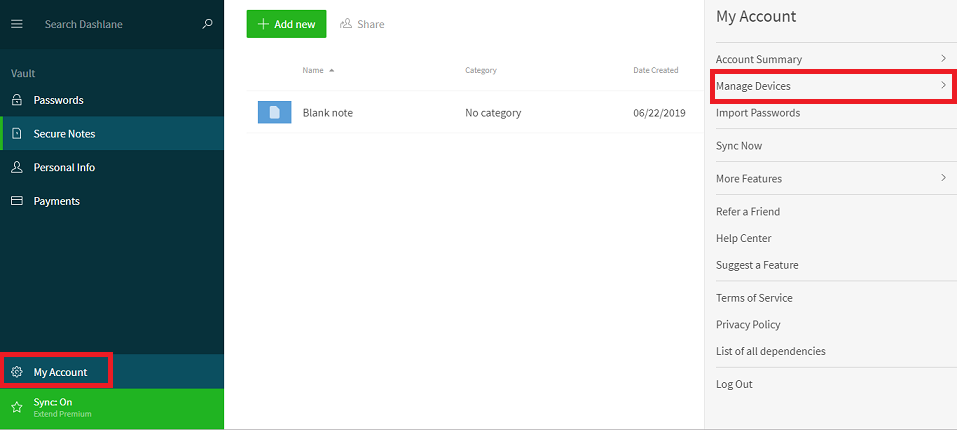
Revoking A Device’s Access to your Dashlane Account
Login to the web portal navigate to My Account and select the Manage Devices option. You will find a list of all devices that have access to your Dashlane account. Once you have revoked their permissions they cannot log in to your account without the authentication code that is sent directly to your mail.
How to Fix “Printer is in an error state” Issue?
- Recognizing the importance of a printer’s duty cycle is crucial for choosing a device that matches your print volume needs. Staying within this limit ensures the printer operates efficiently and prolongs its lifespan, minimizing the risk of maintenance issues.
- Proper humidity, temperature, and cleanliness management can significantly enhance printer performance and maintain its duty cycle, preventing unnecessary wear.
- Enhancing a printer with upgrades like additional memory or better mechanical parts can improve its workload handling and extend its practical duty cycle, boosting overall durability and efficiency.
When choosing a new printer, you might come across the term “ duty cycle ” in the specifications. This guide will explain what a duty cycle is, why it matters, and how it can help you choose the right printer. We’ll keep things simple so you can easily understand how to use this information when shopping for a printer.
- Printer Duty Cycle: What It Means and Why It Matters?
- Why the Duty Cycle Is Key to Choosing the Right Printer?
- Duty Cycle vs. Recommended Monthly Print Volume: What’s the Difference?
- What Happens If You Ignore Printer Duty Cycle Recommendations? ↪ Real-World Scenarios: Why Exceeding the Duty Cycle Can Cost You
Printer Duty Cycle: What It Means and Why It Matters?

What is the meaning of Printer Duty Cycle?
The printer duty cycle represents the upper limit of a printer’s capacity—how many pages it can reliably process in a month before the risk of wear or malfunction increases. This figure is crucial for understanding printer performance limits and ensuring that your chosen printer can handle the expected work volume.
Manufacturers determine a printer’s duty cycle through stress testing, where the printer is pushed to its limit to identify how many pages it can produce each month before malfunctioning. These tests help set a reliable performance gateway for users.
A printer’s duty cycle is like a car’s speedometer—you wouldn’t drive a car at top speed all the time, and you shouldn’t push a printer to its maximum duty cycle. Doing so can lead to quicker wear and tear, more frequent maintenance, and a shorter lifespan.
If you’re unsure whether to choose an inkjet or laser printer, this detailed guide compares both options to help you make an informed decision.
Why the Duty Cycle Is Key to Choosing the Right Printer?

The Importance of Duty Cycle in printer selection
Knowing the duty cycle is essential when choosing a printer, as it determines how well the device can handle your monthly print volume without excessive wear or maintenance.
Here is why the duty cycle matters in printer selection:
- Fit for purpose: Selecting a printer with a suitable duty cycle ensures it can handle your monthly printing volume efficiently, reducing stress on its components.
- Longer lifespan and better performance: Staying within the duty cycle ensures optimal print quality and speed while prolonging the printer’s life, avoiding frequent breakdowns.
- Cost efficiency and reduced downtime: Operating within the duty cycle minimizes the need for repairs and reduces operational disruptions, managing long-term costs.
Duty Cycle vs. Recommended Monthly Print Volume: What’s the Difference?

Duty Cycle vs. recommended monthly print volume
The recommended monthly print volume is the optimal number of pages a printer should handle each month for the best performance and longevity. Unlike the maximum capacity indicated by the duty cycle, this number guides regular usage, ensuring the printer operates efficiently without excessive wear.
If your print volume regularly exceeds the recommended amount but stays within the duty cycle, the printer may operate safely in the short term, but it could still experience accelerated wear and reduced lifespan over time.
In such cases, consider upgrading to a higher-capacity printer or spreading print jobs across multiple devices to ensure long-term performance.
Here are the differences between the duty cycle and recommended monthly print volume:
- Duty cycle: Represents the maximum number of pages a printer can handle in a month without breaking down. It assesses the printer’s upper limit.
- Recommended monthly print volume: Suggests a practical, workable number of pages to print each month to keep the printer in good condition over its lifespan.
What Happens If You Ignore Printer Duty Cycle Recommendations?

Consequences of ignoring Duty Cycle recommendations |AndranikHakobyan via Canva
Ignoring the duty cycle limits poses more severe risks than exceeding the recommended monthly print volume, leading to serious long-term consequences.
While exceeding the recommended volume occasionally may result in additional wear and tear, consistently exceeding the duty cycle can lead to frequent breakdowns, reduced performance, and a shortened lifespan.
Ignoring duty cycle limits leads to frequent breakdowns, reduced performance, and increased maintenance, ultimately shortening the printer’s lifespan and causing more frequent operational downtime and higher repair costs. Long-term, pushing a printer beyond its limits leads to greater financial burdens due to premature replacements and inefficiencies.
↪ Real-World Scenarios: Why Exceeding the Duty Cycle Can Cost You
For example, in a busy law firm, overlooking duty cycle limits during a high-stakes period could cause a printer breakdown just before a critical deadline, delaying crucial legal filings and ultimately compromising client service.
For small businesses, consistently exceeding a printer’s duty cycle can lead to costly emergency repairs or premature equipment replacements, straining financial resources.
