Lenovo Yoga 2 , like most smart devices, is designed to automatically rotate the screen when you turn around using the sensors built into it. As seen with mobile and other smart-tablet devices, the sensor program can sometimes stuck or due to a software glitch it may stop functioning the way it should. In this guide i will walk you through a couple of steps to address this issue.
There should be a screen rotation lock, press it while the Yoga 2 is in the Tablet Mode and then test to see if it moves or not.
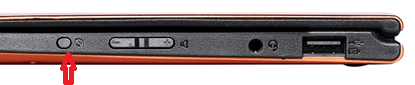
If you have attached any covers or external displays, remove them. Sometimes, these covers or externals displays prevent the screen from rotating automatically.
