There have been some reports about, users who are trying to connect to a web server with different ports but getting an error “ ERR_UNSAFE_PORT ”. This is because of using the unsafe port on your browser, which is not letting you through for security purpose.
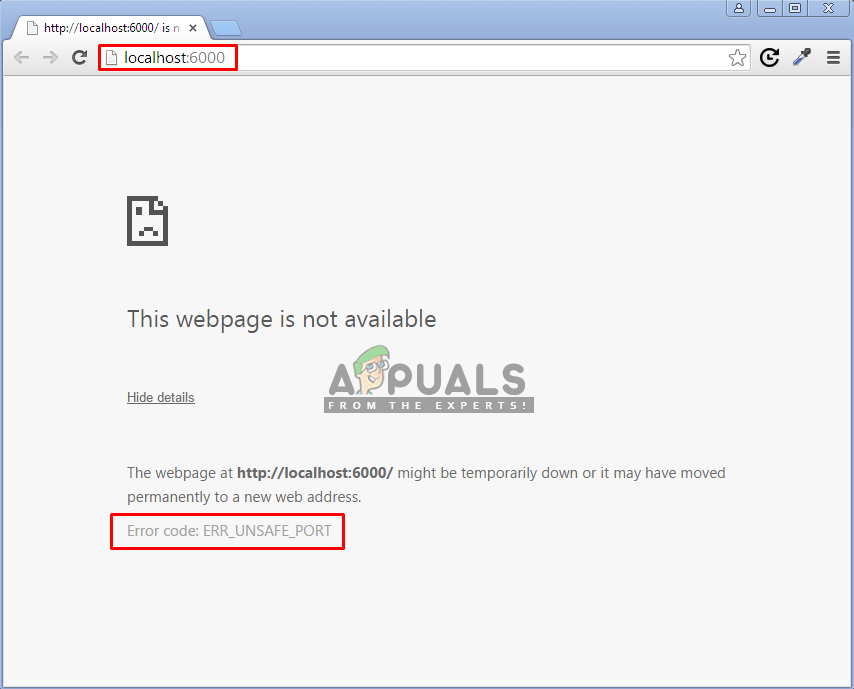
Error Code: ERR_UNSAFE_PORT
What causes the ERR_UNSAFE_PORT error?
This error is caused because your browser is stopping you to access the unsafe ports. Web developers are aware of the security and that browser is incredibly obliging to attackers when it comes to making a request on servers on your behalf. Through the unsafe ports, attackers can trick the web browser into something that can be harmful for the user.
Allowing Unsafe/Restricted ports on your Browser
To fix this error, you need to explicitly allow the unsafe ports that you are trying to access on your browser. Different browsers will have different methods of allowing restricted ports access. Below we will guide you about Chrome and Firefox methods:
For Chrome:
To allow ports in chrome, you just need to go in the properties of Chrome shortcut and add the following line in the shortcut target with the port you want to access.
- Right click on Chrome Shortcut
- Select Properties
- Now Append — explicitly-allowed-ports=xxx to shortcut target Example: C:\Program Files (x86)\Google\Chrome\Application\chrome.exe –explicitly-allowed-ports=6666 Adding the line in the target path Note : there are two ” – – ” dash without spaces before the word explicitly. You can also add multiple ports by using the comma between them.
For Firefox:
For Firefox, you can allow the ports by using the network.security.ports.banned.override . But the updated versions of Firefox doesn’t contain this option in their about:config by default. So you have to add this manually.
- Type “ about:config ” in the URL
- Now right-click on the list and select New>String Adding new string
- Then create a string with the name “ network.security.ports.banned.override ” Adding the network.security.ports.banned.override
- In value, you can add ports by these methods 1-65535 (All Ports) 87,88,89,1050 (for few ports with commas) Ports for the string value
Restricted ports on Chrome:
1,       // tcpmux


7,       // echo


9,       // discard


11,      // systat


13,      // daytime


15,      // netstat


17,      // qotd


19,      // chargen


20,      // ftp data


21,      // ftp access


22,      // ssh


23,      // telnet


25,      // smtp


37,      // time


42,      // name


43,      // nicname


53,      // domain


77,      // priv-rjs


79,      // finger


87,      // ttylink


95,      // supdup


101,     // hostriame


102,     // iso-tsap


103,     // gppitnp


104,     // acr-nema


109,     // pop2


110,     // pop3


111,     // sunrpc


113,     // auth


115,     // sftp


117,     // uucp-path


119,     // nntp


123,     // NTP


135,     // loc-srv /epmap


139,     // netbios


143,     // imap2


179,     // BGP


389,     // ldap


427,     // SLP (Also used by Apple Filing Protocol)


465,     // smtp+ssl


512,     // print / exec


513,     // login


514,     // shell


515,     // printer


526,     // tempo


530,     // courier


531,     // chat


532,     // netnews


540,     // uucp


548,     // AFP (Apple Filing Protocol)


556,     // remotefs


563,     // nntp+ssl


587,     // stmp?


601,     // ??


636,     // ldap+ssl


993,     // ldap+ssl


995,     // pop3+ssl


2049,    // nfs


3659,    // apple-sasl / PasswordServer


4045,    // lockd


6000,    // X11


6665,    // Alternate IRC [Apple addition]


6666,    // Alternate IRC [Apple addition]


6667,    // Standard IRC [Apple addition]


6668,    // Alternate IRC [Apple addition]


6669,    // Alternate IRC [Apple addition]


6697,    // IRC + TLS
Restricted ports on Firefox:
1,       // tcpmux


7,       // echo


9,       // discard


11,      // systat


13,      // daytime


15,      // netstat


17,      // qotd


19,      // chargen


20,      // ftp data


21,      // ftp access


22,      // ssh


23,      // telnet


25,      // smtp


37,      // time


42,      // name


43,      // nicname


53,      // domain


77,      // priv-rjs


79,      // finger


87,      // ttylink


95,      // supdup


101,     // hostriame


102,     // iso-tsap


103,     // gppitnp


104,     // acr-nema


109,     // pop2


110,     // pop3


111,     // sunrpc


113,     // auth


115,     // sftp


117,     // uucp-path


119,     // nntp


123,     // NTP


135,     // loc-srv /epmap


139,     // netbios


143,     // imap2


179,     // BGP


389,     // ldap


465,     // smtp+ssl


512,     // print / exec


513,     // login


514,     // shell


515,     // printer


526,     // tempo


530,     // courier


531,     // chat


532,     // netnews


540,     // uucp


587,     // stmp?


601,     // ??


636,     // ldap+ssl


993,     // ldap+ssl


995,     // pop3+ssl


2049,    // nfs


3659,    // apple-sasl / PasswordServer


4045,    // lockd


6000,    // X11
