These days everyone has an overhead tank at their homes. In any case, everybody who has a water tank above knows the sort of issues that they face. This problem can be tackled in an electronic way. Fundamentally, the unit is comprised of different sensors going about as a switch. When we start the water pump water starts to get pumped from the underground water reservoir to the overhead tank. In the tank, there is a set of sensors and they act like a switch. When the water pump is started and the water level starts to rise, what actually happens is that every sensor gets activated one by one and finally, when the water level reaches the topmost sensor a buzzer is activated from the unit indicating that the tank is full and one needs to turn off the water pump hence, saving the electricity bill and as well as flow of water from the tank.
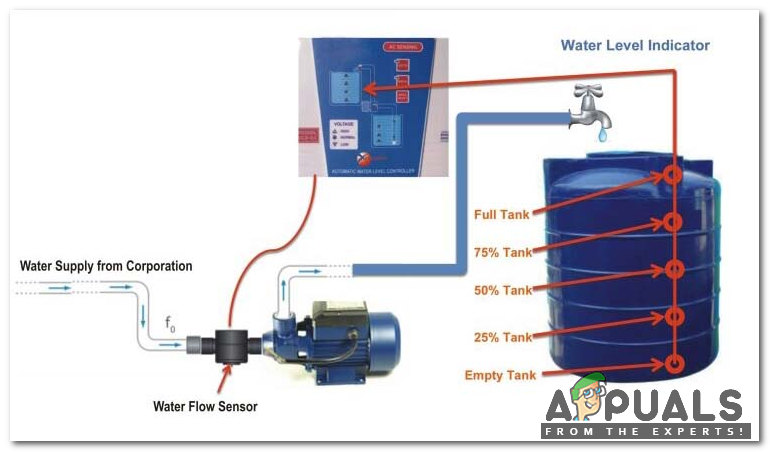
Water Level Detector
How to make a Unit which will extract information about the quantity of water present in the tank?
Let’s move on to the designing part in which we will first design the circuit and then do the conversion from A/C 240V to the regulated 5V for operating the circuit.
Step 1: Collecting The Components.
The components used in this project are easily available in the market.
- No products found.
- LED’s (1 Red, 1 Yellow, 1 Green, 1 Blue)
- No products found.
- No products found.
- Step Down Transformer
- PCB Board
Step 2: Setting Up The Apparatus.
Now, that we’ve collected all the components let’s assemble them and design the circuit.
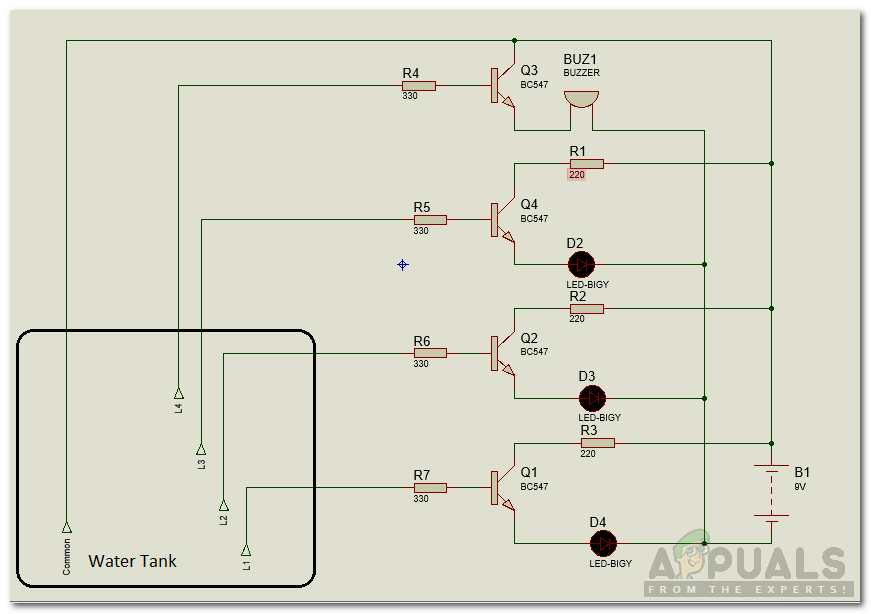
Circuit Diagram
Step 3: Working Principle.
Among all the components the most important components are Transistors BC 547. There is a total of 7 transistors and they will be sensing the water level. LED’s will be monitoring the water level in the tank and the functionality of each LED is explained below :
- Red LED: It indicates that there is no water in the tank and none of the sensors is in contact with the water and the tank needs to be refilled.
- Yellow LED: Level 2: Indication of 1/4 of water in the tank.
- Green LED: Level 3: Indication of half of the water in the tank.
- Blue LED: Level 4: Full indication of water in the tank and buzzer comes on.
Presently, as the water ascends the sensors begin to get in contact with the water and the transistors are activated and there is a progression of current in the transistors making the LED’s light up. There is a current limiting resistor involved between transistor and LED and it prevents higher voltage to destroy the LED. LED’s light up from Red to Yellow and then Green and finally Blue, thus making a sound.
Step 4: Putting the Circuit in a Box.
We need to put the circuit in a small box and make holes in it appropriately so that LED’s may come out of the box easily. Then cut the plastic board for the Power Switch. Take a PCB board and solder the LED’s on it according to the levels defined above. Stick the buzzer behind the PCB board and also fix the power supply by taking care of the transformer. After analyzing the circuit we came to know that five supply lines need to be taken out from the main circuit board to the sensor. Four lines are of the sensors and one is for Common Positive Pin .
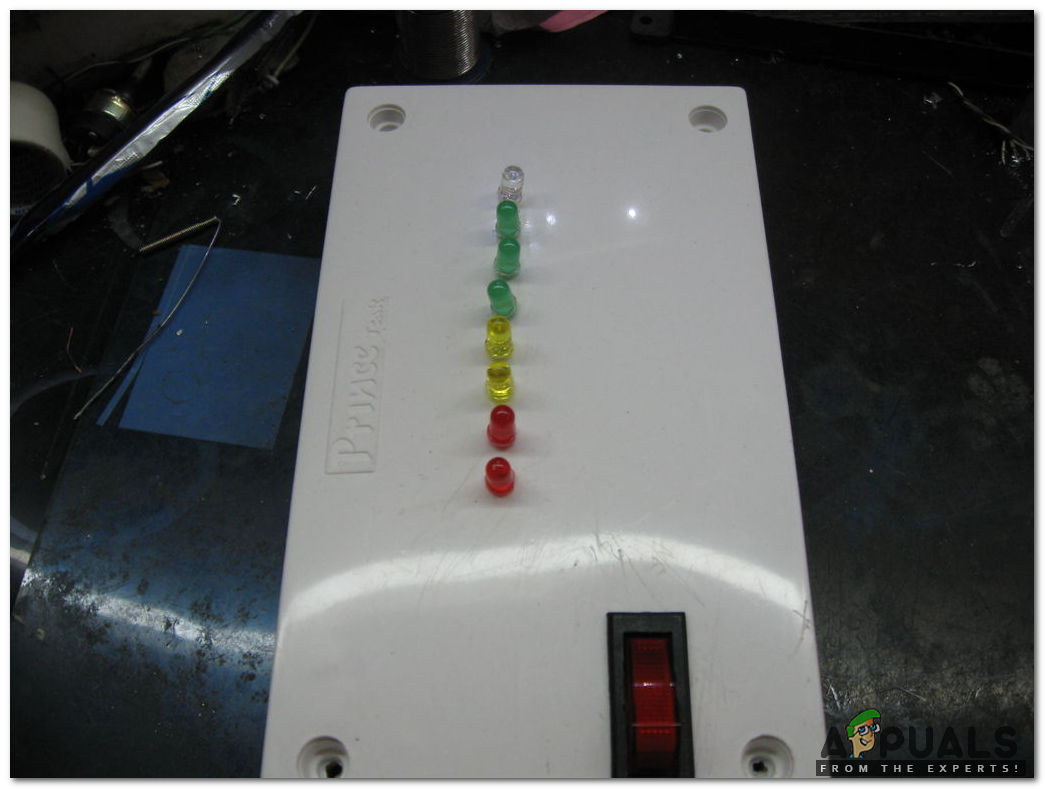
Circuit Box
Step 5: Designing Sensors.
We possibly need to make two channels so when they are in contact with water they will go about as a switch, as water is a good conductor of electricity. We can use a PVC pipe and make holes in it. Firstly, measure the height of the tank and then with equal intervals mark 4 points on it. Make holes on those points and then make a loop of wire which will be carrying the current. Fix that loop of wire with nuts and bolts in that PVC pipe and afterward add a common wire to the casing. The hole of the bare wire and bolt should be kept a minimum and in the event that you need, you can solder a little bit of wire to the common line just next to the nut and screw as the sensing would be more at the point when the water interacts with the normal wire and the bolt, there will be transfer of current from the stripped wire to the bolt and hence, the sensing part is complete.
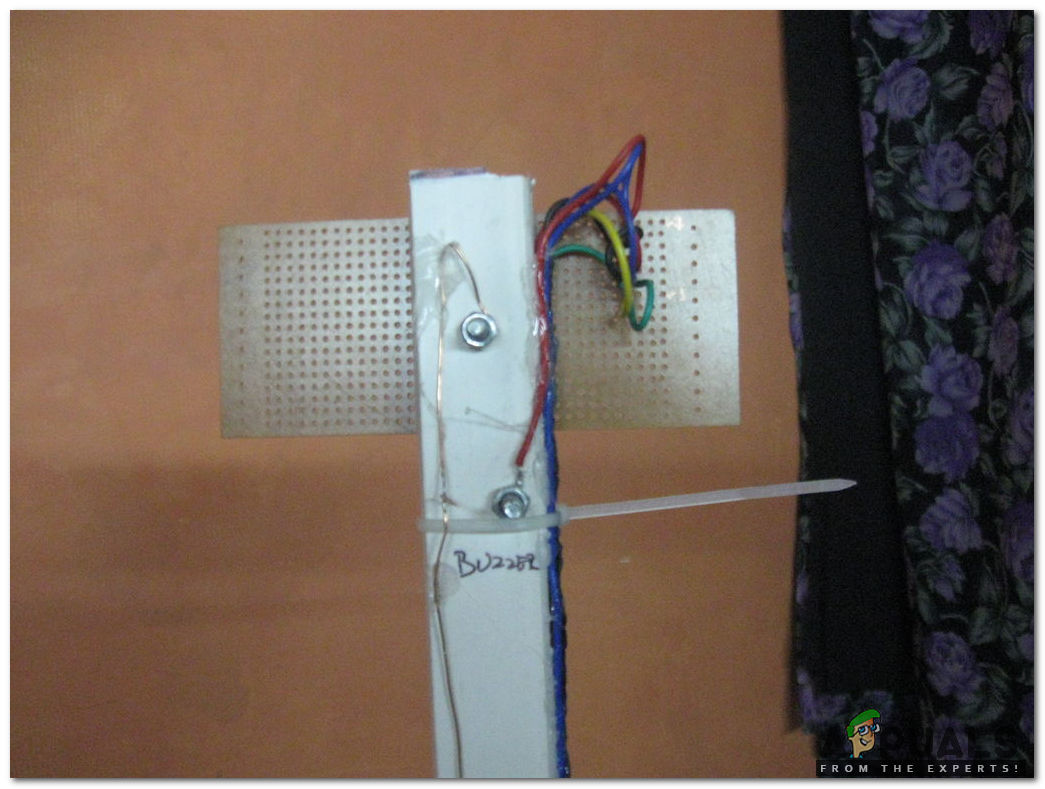
Designed Sensors
Step 6: Installing the Designed Prototype.
Finally, we will install the device into the tank. Firmly fix the rod inside the tank and make sure that the rod (PVC pipe) touches the bottom of the tank. Presently for the establishment of the gadget, we should locate a reasonable spot for a clear view of LED lights. Choose that place which is out of reach of children and from where you can easily turn ON and OFF the switch. We will screw the two L hooks to the device and fix it into the wall and afterward take A/C 220V from any socket and give it to the board.
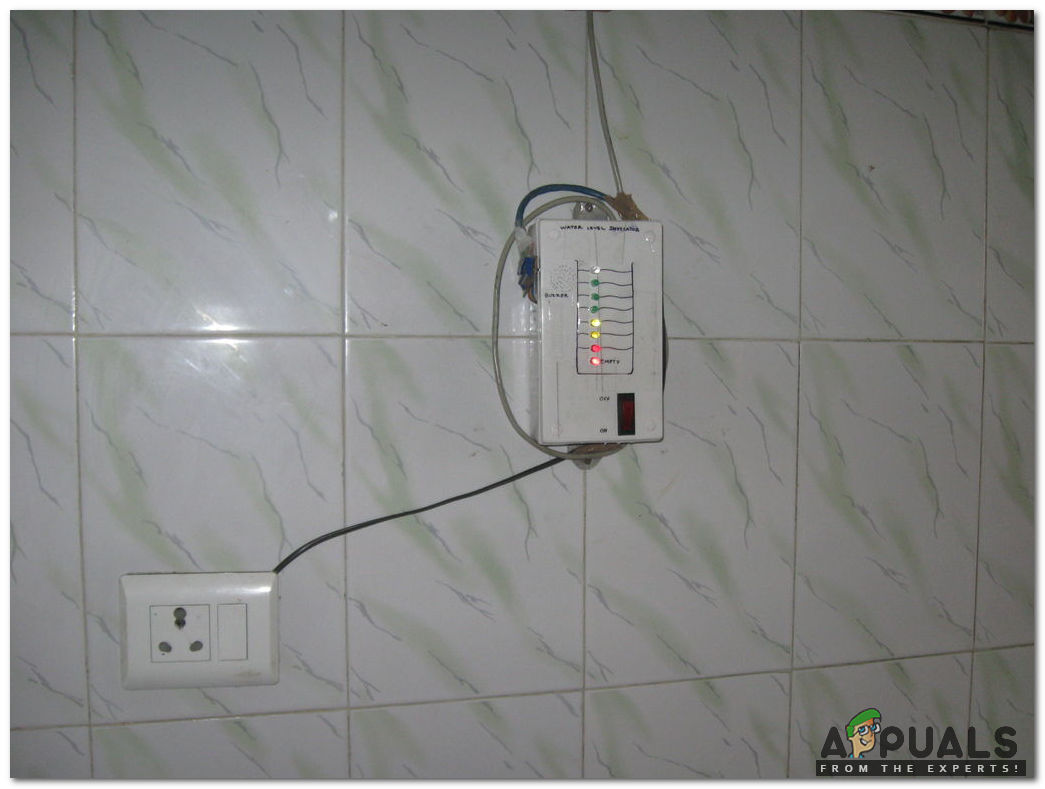
Device Indicating that the tank needs to be refilled
We have successfully installed the device and it is indicating the water level in the tank. We can observe that LEDs are glowing and the topmost blue LED will glow when the tank is filled thus, turning ON the buzzer.
How to Fix “Printer is in an error state” Issue?
- Recognizing the importance of a printer’s duty cycle is crucial for choosing a device that matches your print volume needs. Staying within this limit ensures the printer operates efficiently and prolongs its lifespan, minimizing the risk of maintenance issues.
- Proper humidity, temperature, and cleanliness management can significantly enhance printer performance and maintain its duty cycle, preventing unnecessary wear.
- Enhancing a printer with upgrades like additional memory or better mechanical parts can improve its workload handling and extend its practical duty cycle, boosting overall durability and efficiency.
When choosing a new printer, you might come across the term “ duty cycle ” in the specifications. This guide will explain what a duty cycle is, why it matters, and how it can help you choose the right printer. We’ll keep things simple so you can easily understand how to use this information when shopping for a printer.
- Printer Duty Cycle: What It Means and Why It Matters?
- Why the Duty Cycle Is Key to Choosing the Right Printer?
- Duty Cycle vs. Recommended Monthly Print Volume: What’s the Difference?
- What Happens If You Ignore Printer Duty Cycle Recommendations? ↪ Real-World Scenarios: Why Exceeding the Duty Cycle Can Cost You
Printer Duty Cycle: What It Means and Why It Matters?

What is the meaning of Printer Duty Cycle?
The printer duty cycle represents the upper limit of a printer’s capacity—how many pages it can reliably process in a month before the risk of wear or malfunction increases. This figure is crucial for understanding printer performance limits and ensuring that your chosen printer can handle the expected work volume.
Manufacturers determine a printer’s duty cycle through stress testing, where the printer is pushed to its limit to identify how many pages it can produce each month before malfunctioning. These tests help set a reliable performance gateway for users.
A printer’s duty cycle is like a car’s speedometer—you wouldn’t drive a car at top speed all the time, and you shouldn’t push a printer to its maximum duty cycle. Doing so can lead to quicker wear and tear, more frequent maintenance, and a shorter lifespan.
If you’re unsure whether to choose an inkjet or laser printer, this detailed guide compares both options to help you make an informed decision.
Why the Duty Cycle Is Key to Choosing the Right Printer?

The Importance of Duty Cycle in printer selection
Knowing the duty cycle is essential when choosing a printer, as it determines how well the device can handle your monthly print volume without excessive wear or maintenance.
Here is why the duty cycle matters in printer selection:
- Fit for purpose: Selecting a printer with a suitable duty cycle ensures it can handle your monthly printing volume efficiently, reducing stress on its components.
- Longer lifespan and better performance: Staying within the duty cycle ensures optimal print quality and speed while prolonging the printer’s life, avoiding frequent breakdowns.
- Cost efficiency and reduced downtime: Operating within the duty cycle minimizes the need for repairs and reduces operational disruptions, managing long-term costs.
Duty Cycle vs. Recommended Monthly Print Volume: What’s the Difference?

Duty Cycle vs. recommended monthly print volume
The recommended monthly print volume is the optimal number of pages a printer should handle each month for the best performance and longevity. Unlike the maximum capacity indicated by the duty cycle, this number guides regular usage, ensuring the printer operates efficiently without excessive wear.
If your print volume regularly exceeds the recommended amount but stays within the duty cycle, the printer may operate safely in the short term, but it could still experience accelerated wear and reduced lifespan over time.
In such cases, consider upgrading to a higher-capacity printer or spreading print jobs across multiple devices to ensure long-term performance.
Here are the differences between the duty cycle and recommended monthly print volume:
- Duty cycle: Represents the maximum number of pages a printer can handle in a month without breaking down. It assesses the printer’s upper limit.
- Recommended monthly print volume: Suggests a practical, workable number of pages to print each month to keep the printer in good condition over its lifespan.
What Happens If You Ignore Printer Duty Cycle Recommendations?

Consequences of ignoring Duty Cycle recommendations |AndranikHakobyan via Canva
Ignoring the duty cycle limits poses more severe risks than exceeding the recommended monthly print volume, leading to serious long-term consequences.
While exceeding the recommended volume occasionally may result in additional wear and tear, consistently exceeding the duty cycle can lead to frequent breakdowns, reduced performance, and a shortened lifespan.
Ignoring duty cycle limits leads to frequent breakdowns, reduced performance, and increased maintenance, ultimately shortening the printer’s lifespan and causing more frequent operational downtime and higher repair costs. Long-term, pushing a printer beyond its limits leads to greater financial burdens due to premature replacements and inefficiencies.
↪ Real-World Scenarios: Why Exceeding the Duty Cycle Can Cost You
For example, in a busy law firm, overlooking duty cycle limits during a high-stakes period could cause a printer breakdown just before a critical deadline, delaying crucial legal filings and ultimately compromising client service.
For small businesses, consistently exceeding a printer’s duty cycle can lead to costly emergency repairs or premature equipment replacements, straining financial resources.
