Charging speeds on smartphones have come a long way, with most phones nowadays being capable of going from 0-100% battery in less than an hour. However, dial back just a few years ago and the situation was very different. Due to the infancy of fast charging tech, older phones were limited to slower speeds.
So, if you have a relatively aging phone or even a modern one that you just want to juice up faster, this guide is for you. We will go over some common myths about charging while giving you the best tips and tricks on how to make your phone charge faster.
- Check your cable
- Use a Faster Power Adapter
- Use a Wall Socket when Charging
- Stop Using Your Phone When Charging
- Remove your Phone’s Case
- Don’t Charge Your Phone in a Hot, Humid Room
- Turn off Optimized Charging
- Turn on Airplane Mode
- Check for updates
- Turn off your Phone Entirely
- Time to Change Your Phone?

Plugging a Lightning cable into an iPhone | Tribune
Wait, how does my phone charge?
Before we get into the methods, it’s crucial to understand the science behind charging. Essentially, when your phone charges it receives an electric current from the power source that starts a chemical reaction in the battery. The faster this chemical reaction happens the quicker your phone is charged.
As you can expect, simply brute-forcing this is not enough. If you try to accelerate the reaction too much, it generates heat and puts stress on the circuitry beyond its limits. That’s why, today, you see all those charging technologies and protocols from different manufacturers, such as USB-PD and Qualcomm’s QuickCharge . They allow your phone to charge faster while being safer and preserve the health of your battery in the longer run.
1. Check your cable
Firstly, ensure that the cable you’re using is actually compatible with both your phone and the power adapter. Just because it connects doesn’t mean it’s the right choice. For instance, using just a generic cable with a OnePlus charger on a OnePlus phone won’t fast-charge it to its fullest potential. This is because proprietary charging tech (such as OnePlus’ WARP/SuperVOOC ) requires you have specific hardware made only for that phone/adapter.
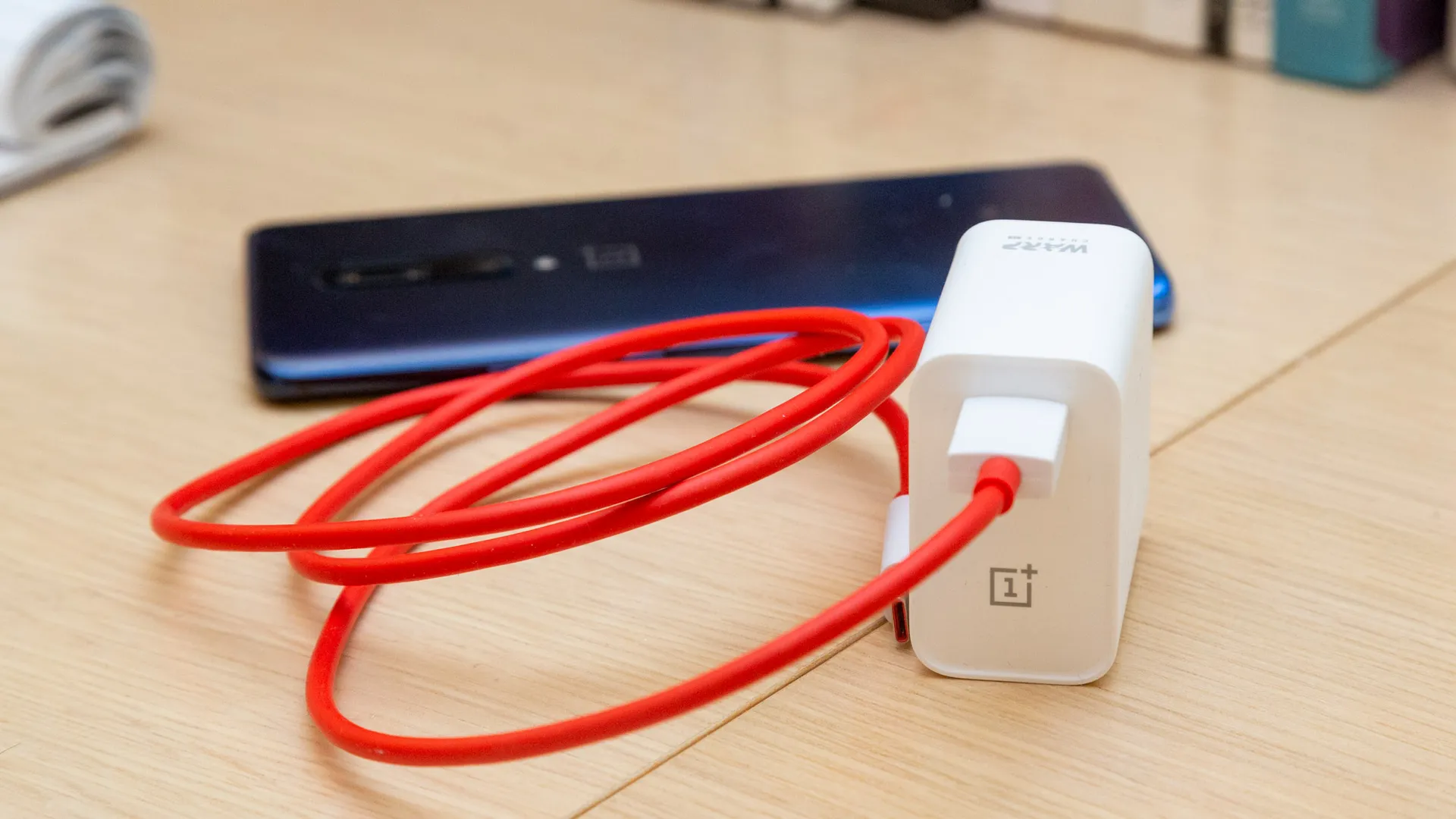
OnePlus 30W charger | TechRadar
Regularly check the cable for any signs of damage or wear — a broken or frayed cable can impede charging and might even be hazardous. Moreover, quality is paramount; always use original cables straight from the manufacturer or opt for high-quality alternatives from reputable brands. Skimping on quality will lead you to cables that can’t provide enough power to fast-charge your phone.
2. Use a Faster Power Adapter
Even though almost every phone nowadays comes with fast charging technology , most of them don’t come with a power adapter that supports it. This means that any other adapter you use will most likely not fully utilize the potential of your phone, thus charging at a much slower rate.
Take an iPhone for example. If you try and charge it with a normal power adapter , it’ll only charge at 10W , but if you use Apple’s proprietary 20W charging brick, it’ll charge at double the speed. The same goes for the newest S23 Ultra ; that can charge at a decent 45W ( 57min ), but if you use a normal 10W adapter, the time taken for a full charge effectively doubles, and now the same phone will complete its charge in 125 minutes .

Xiaomi’s 120W Power Adapter | Xiaomi
The obvious drawback here is that you’ll need to invest in a charger separately in most cases since companies suddenly care so much about the environment now. Besides, USB-C has become the industry standard now, so one charger could take care of all your devices, even your iPhone.
3. Use a Wall Socket when Charging
A lot of people, for their convenience prefer to plug their charging cable into their laptops, PCs or even their cars, which can drastically slow down the charging speed. This is because standard USB ports typically deliver a lot less power than a wall socket.

Chargers plugged in a wall socket | Wallpaper Flare
Also, for reasons mentioned above, plugging in your charger using a power adapter into a wall socket can be beneficial. In addition to this, a wall socket, in most cases, will provide you with an uninterrupted supply of power , rather than – say, a PC.
This is because laptops, PCs and even cars are designed to prioritize power to other components, when needed. Not to mention how with a wall socket, it’s more convenient rather than worrying about having your car, or PC being on for the whole cycle of your charge. You could still use these when needed, but make sure that your main source of charging your phone is using a power adapter via a wall socket.
If you travel constantly, we’d recommend you buy a Power Bank, since it doesn’t hinder your charging speed while also delivering portable power.
4. Stop Using Your Phone When Charging
When charging your phone, it is important to keep it cool and to minimize the use of extensive resources. such as gaming or binging a show. If not taken care of, both of these factors can easily damage the battery in the long run. While no concrete evidence suggests that you shouldn’t use your phone while charging , heat can still build up.
Think of heat as one of three boss enemies of electronics (the other being dust and moisture) and using your phone while it’s charging may overwork the internals to heat it up more than usual. To prevent this, try to avoid using your phone as much as possible while it is charging. If you must use it, try to keep it in a cool place and close any unnecessary apps.
5. Remove your Phone’s Case
As we’ve established by now, heat is no good for a smartphone and extra heat when it’s charging is even worse. To make sure this doesn’t happen, one way is to remove its case – if there is any. Most cases are made out of silicon, or some sorts of thermoplastic, both of which are not good conductors of heat.
This makes it difficult for the phone to dissipate heat, which can overheat the phone itself and make it move past it’s ideal charging temperature range, which is 5C – 45C . If you notice that your phone charges faster or is generally cooler with the case off then it’s time for a new one.
6. Don’t Charge Your Phone in a Hot, Humid Room
As we learned at the start of this article, the chemical reaction that serves as the foundation of batteries generates heat. Charging your phone in a hot environment can further lead to increased battery temperatures, which can accelerate battery degradation and, in extreme cases, cause physical damage like swelling and trust us – this issue is more common than it sounds .

Temperature warning on an iPhone | Apple
If you’ve ever plugged in your phone and later found it hasn’t charged, overheating safety measures might be the reason. While humidity itself doesn’t directly slow down charging, charging in very humid environments can pose risks, such as potential condensation inside the device. It’s best to charge in a cool, dry place to ensure optimal battery health and safety.
7. Turn off Optimized Charging
Most phones these days comes with some sort of optimized charging feature built into the software. This works in tandem with the physical hardware to preserve the phone’s battery health by fast-charging it to only 80% then trickle charging to a full 100% based on your usage patterns. While this is great for your battery, it does mean the phone will charge slower overall.
You can find this option under the Battery option in the Settings app on most phones (Android and iPhone). If you can’t seem to find it, just Google “optimized charging” with your phone’s model to see where it is—there might be a slim chance you don’t have it. Anyhow, we only recommend turning this off occasionally as the feature is designed to prolong your phone’s battery.

8. Turn on Airplane Mode
Turning on Airplane Mode can be a lifesaver in a lot of situations where you need to top-up your battery but you’re in a hurry. It’s simple, really – airplane mode shuts off all most of your resources linked to connectivity such as Wi-Fi , mobile data, and even calls, which can save up a lot of battery since they won’t deplete the battery while it’s being juiced up, effectively improving charging speeds.

Turning on Airplane mode | AT&T
Keep in mind that during the time airplane mode is on, your phone will be shut off from the internet, and you won’t receive any calls or messages. We don’t recommend this for everyone, but for those who know they can manage spending a bit of time away, or have another means of checking their e-mails, well, go power-napping .
9. Check for updates
Before going over the last resort, ensure your phone’s software is up-to-date. While some tech enthusiasts might hesitate to update due to concerns about new bugs or changes in user experience ( looking at you, OxygenOS ), it’s crucial to remember that manufacturers release updates not just for new features, but also for maintaining and optimizing device performance, including battery function.
To check for updates:
- Navigate to your phone’s settings.
- Look for the “ Software Update ” section, which might be under “ About Phone “, “ System Information “, or “ General ” for iPhone users.
- Tap on “ Check for updates ” or a similar option.
- If an update is available, install it and restart your device.

Checking for updates on a OnePlus phone
Post-update, your phone might just start to charge faster if the manufacturer addressed it in any related issues.
10. Turn off your Phone Entirely
For a phone, if you need to squeeze out every bit of speed while charging, there is no better way than using the recommended charger with the phone being off. When you power off your phone, it uses almost none of the power from the battery, and hence the charging process takes a lot less time.
Time to Change Your Phone?
If you’ve tried all of the above tips and your phone is still not charging as fast as you would like, it may be time to consider changing your phone’s battery or even the phone entirely. Batteries naturally degrade over time, and they may not be able to hold a charge as well as they used to. If your phone is more than a few years old, it is likely that the battery is the culprit.
Sure, charging your battery in any way will degrade it’s battery over time, but taking some preemptive steps can prolong your visit to a phone store. Also, you’re not giving up anything in return for this, but smartly managing your devices, and knowing how they work can go a long way in saving you a lot of time in the long run.
Different phones come with varying charging technologies and protocols. Manufacturers like OnePlus or Xiaomi might have proprietary fast-charging tech that requires specific hardware and software combinations to achieve optimal speeds.
While not all third-party chargers or cables are harmful, using low-quality or incompatible ones can impede charging, be hazardous, or even damage the phone. It’s always best to use recommended or reputable products.
Heat can accelerate battery degradation and reduce its lifespan. Consistent exposure to high temperatures while charging can also pose safety risks, like battery swelling.
Regular charging fills up the battery as quickly as the tech allows. Optimized charging, on the other hand, controls the charging speed to prolong battery health, often by fast-charging up to a certain percentage and then slowing down.
Not necessarily. Before considering a new phone, check the cable, adapter, software updates, and battery health. Sometimes, simply changing a worn-out cable or updating the software can resolve the issue.
How to Fix “Printer is in an error state” Issue?
- Recognizing the importance of a printer’s duty cycle is crucial for choosing a device that matches your print volume needs. Staying within this limit ensures the printer operates efficiently and prolongs its lifespan, minimizing the risk of maintenance issues.
- Proper humidity, temperature, and cleanliness management can significantly enhance printer performance and maintain its duty cycle, preventing unnecessary wear.
- Enhancing a printer with upgrades like additional memory or better mechanical parts can improve its workload handling and extend its practical duty cycle, boosting overall durability and efficiency.
When choosing a new printer, you might come across the term “ duty cycle ” in the specifications. This guide will explain what a duty cycle is, why it matters, and how it can help you choose the right printer. We’ll keep things simple so you can easily understand how to use this information when shopping for a printer.
- Printer Duty Cycle: What It Means and Why It Matters?
- Why the Duty Cycle Is Key to Choosing the Right Printer?
- Duty Cycle vs. Recommended Monthly Print Volume: What’s the Difference?
- What Happens If You Ignore Printer Duty Cycle Recommendations? ↪ Real-World Scenarios: Why Exceeding the Duty Cycle Can Cost You
Printer Duty Cycle: What It Means and Why It Matters?

What is the meaning of Printer Duty Cycle?
The printer duty cycle represents the upper limit of a printer’s capacity—how many pages it can reliably process in a month before the risk of wear or malfunction increases. This figure is crucial for understanding printer performance limits and ensuring that your chosen printer can handle the expected work volume.
Manufacturers determine a printer’s duty cycle through stress testing, where the printer is pushed to its limit to identify how many pages it can produce each month before malfunctioning. These tests help set a reliable performance gateway for users.
A printer’s duty cycle is like a car’s speedometer—you wouldn’t drive a car at top speed all the time, and you shouldn’t push a printer to its maximum duty cycle. Doing so can lead to quicker wear and tear, more frequent maintenance, and a shorter lifespan.
If you’re unsure whether to choose an inkjet or laser printer, this detailed guide compares both options to help you make an informed decision.
Why the Duty Cycle Is Key to Choosing the Right Printer?

The Importance of Duty Cycle in printer selection
Knowing the duty cycle is essential when choosing a printer, as it determines how well the device can handle your monthly print volume without excessive wear or maintenance.
Here is why the duty cycle matters in printer selection:
- Fit for purpose: Selecting a printer with a suitable duty cycle ensures it can handle your monthly printing volume efficiently, reducing stress on its components.
- Longer lifespan and better performance: Staying within the duty cycle ensures optimal print quality and speed while prolonging the printer’s life, avoiding frequent breakdowns.
- Cost efficiency and reduced downtime: Operating within the duty cycle minimizes the need for repairs and reduces operational disruptions, managing long-term costs.
Duty Cycle vs. Recommended Monthly Print Volume: What’s the Difference?

Duty Cycle vs. recommended monthly print volume
The recommended monthly print volume is the optimal number of pages a printer should handle each month for the best performance and longevity. Unlike the maximum capacity indicated by the duty cycle, this number guides regular usage, ensuring the printer operates efficiently without excessive wear.
If your print volume regularly exceeds the recommended amount but stays within the duty cycle, the printer may operate safely in the short term, but it could still experience accelerated wear and reduced lifespan over time.
In such cases, consider upgrading to a higher-capacity printer or spreading print jobs across multiple devices to ensure long-term performance.
Here are the differences between the duty cycle and recommended monthly print volume:
- Duty cycle: Represents the maximum number of pages a printer can handle in a month without breaking down. It assesses the printer’s upper limit.
- Recommended monthly print volume: Suggests a practical, workable number of pages to print each month to keep the printer in good condition over its lifespan.
What Happens If You Ignore Printer Duty Cycle Recommendations?

Consequences of ignoring Duty Cycle recommendations |AndranikHakobyan via Canva
Ignoring the duty cycle limits poses more severe risks than exceeding the recommended monthly print volume, leading to serious long-term consequences.
While exceeding the recommended volume occasionally may result in additional wear and tear, consistently exceeding the duty cycle can lead to frequent breakdowns, reduced performance, and a shortened lifespan.
Ignoring duty cycle limits leads to frequent breakdowns, reduced performance, and increased maintenance, ultimately shortening the printer’s lifespan and causing more frequent operational downtime and higher repair costs. Long-term, pushing a printer beyond its limits leads to greater financial burdens due to premature replacements and inefficiencies.
↪ Real-World Scenarios: Why Exceeding the Duty Cycle Can Cost You
For example, in a busy law firm, overlooking duty cycle limits during a high-stakes period could cause a printer breakdown just before a critical deadline, delaying crucial legal filings and ultimately compromising client service.
For small businesses, consistently exceeding a printer’s duty cycle can lead to costly emergency repairs or premature equipment replacements, straining financial resources.
